| Planning a Project |
| |
| Creating New Textsyles |
| |
| Once you get into more complex drawings, you will need more than one textstyle. One for notes, one for tables, one for the table header, two or three for the title block - I think you get the picture. |
| |
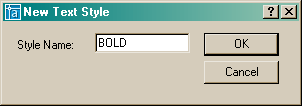
| If you need more than one text style, click on the new button, type in a new name and press OK. |
| |
 |
| |
| Now the Text Style dialog box (as shown above) will have the new name in the Style Name field. Select RomanD.shx for this new style. |
| |
| Now when you add text to your drawing, you have 2 choices. Watch the command line to know when to change to another style. |
| |
Command: text <ENTER>
Current text style: "Standard" Text height: 3.5090
Specify start point of text or [Justify/Style]: S <ENTER>
Enter style name or [?] : BOLD <ENTER>
Current text style: "BOLD" Text height: 3.5090
Specify start point of text or [Justify/Style]: <PICK A POINT>
Specify height <3.5090>: 1 <ENTER>
Specify rotation angle of text <0>: <ENTER>
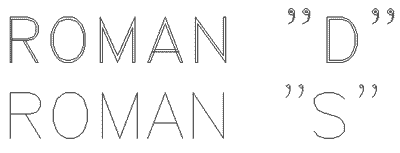
Enter text: ROMAN "D" <ENTER>
Enter text: <ENTER> |
| |
| Of course, there a few ways of entering text in AutoCAD, but this will give you the basic idea. Once you have used the two different styles, it should look something like this: |
| |
 |
| |
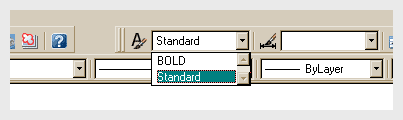
| In this versions of AutoCAD, there is an easy way to change existing text to a new style. First, select the text, then go up to the Text Style Menu (usually towards the top of the screen) and select the style you want from the droplist (below) and the text will change automatically. |
| |
 |
| |
| Professional looking and clear text is essential in any CAD drawing. Practice with different styles until you are comfortable with these concepts. |
| |
| NOTE: AutoCAD uses two types of fonts: true-type and 'SHX' vector fonts. True-type fonts are indicated by a small symbol beside the font name. As a rule, you will want to use the SHX fonts, as AutoCAD can draw these faster. Newer releases of AutoCAD handle true-type faster than before, but they can still slow down your display speed. Another concern when using True-type fonts is that if you are exchanging drawing files with other people, they may not have the same fonts installed on their system. This could lead to formatting problems when they open your files. |
| |
|
| |


