| Getting Started with AutoCAD |
| |
| Accurate Input |
| |
| In this lesson you will complete the drawing that will test your knowledge of drawing accurately using different types of precision input. |
| |
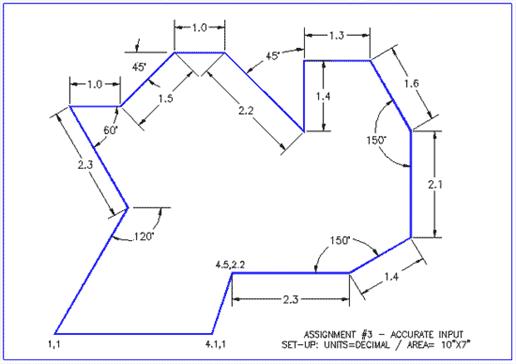
| Print the file out and try to reproduce it. Start at the bottom left corner. You will have to use a combination of absolute, relative, and polar co-ordinate input. |
| |
 |
| |
a. Open AutoCAD and set up the drawing as you have for the previous assignments.
b. Complete the assignment by drawing it accurately using the dimensions provided.
c. If you make an error along the way, remember that you can use your ENDPOINT Osnap to begin where you left off.
d. Save your drawing.
e. Print your drawing. |
| |
| As mentioned earlier, AutoCAD is accurate. It is up to the user to ensure that they give the proper input to make sure that the drawing is accurate. It can be extremely costly to make mistakes with what seem to be 'minor' errors in accuracy. |
| |
| By this point in the tutorials, you should able to do the above drawing without referencing other materials. If this isn't the case, you should review the previous lessons. Here are two more practice excercises to work on your input and drawing skills. |
| |
|
| |


