| Forms |
| |
| Creating Form in Design View |
| |
| To create a form from scratch without
the wizard, follow these steps: |
| 1. Click the New button on the form database window. |
| |
| 2. Select "Design View" and choose the table or query
the form will be associated with the form from the drop-down menu. |
| |
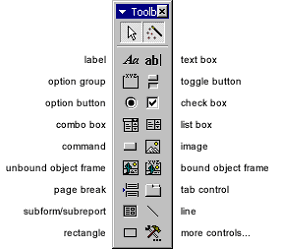
| 3. Select View|Toolbox from the menu bar to view the
floating toolbar with additional options. |
| |
|
| |
| |
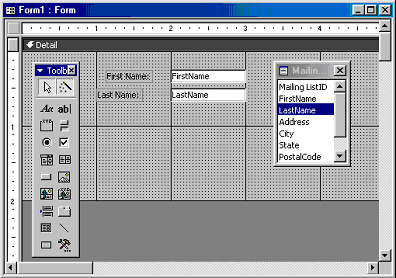
| Add controls to the form by clicking and dragging the
field names from the Field List floating window. Access creates
a text box for the value and label for the field name when this
action is accomplished. To add controls for all of the fields in
the Field List, double-click the Field List window's title bar
and drag all of the highlighted fields to the form. |
| |
|
|
Click Here for Animated Tutorial on Create Form in Design View. |
| |
| |
|
| |
| |