| Introduction To Access |
| Â |
| Creating a database without using the Database Wizard |
| Â |
| 1. When Microsoft Access first starts up, a
dialog box is automatically displayed with options to create a new database
or open an existing one. If this dialog box is displayed, click Blank
Access Database, and then click OK. |
| Â |
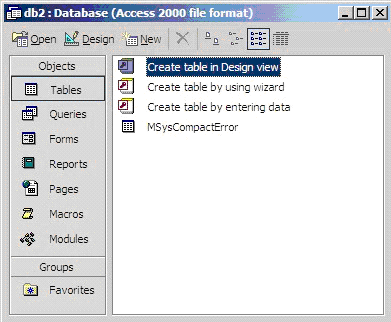
| If you have already opened a database or
closed the dialog box that displays when Microsoft Access starts up,
click New Database on the toolbar, and then double-click the Blank
Database icon on the General tab. Specify a name and location for
the database and click Create. |
| Â |
| (Below is the screen that shows up following (this step) |
| Â |
|
| Â |
| Â |
|
| Â |
| Â |