| Recycle Bin |
| |
| The Recycle Bin |
| |
| The Recycle Bin is nothing more than a space on the hard disk reserved to store information that is deleted so that in the event of deleting a file or folder by mistake it is possible to retrieve it. By default the Recycle Bin restores files or folders to the place from where they were deleted. |
 |
| Example: If a file is deleted from D:\My Documents, when it is restored it will go to that folder. |
| |
The Recycle Bin will maintain the deleted documents until it is emptied.
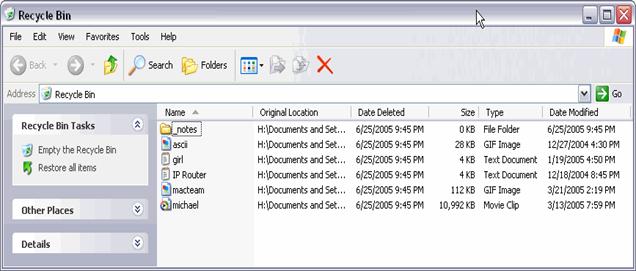
To open the Recycle Bin place the cursor on Desktop and double-click on the Recycle Bin icon. |
| |
 |
| |
| The Recycle Bin window is similar to the Windows Explorer window, and they have similar options in common, such as customizing the window, views, etc.. |
| |
| Note: In the Recycle Bin attributes such as the original location of the file or folder before it was deleted will appear as well as the date and time when it was deleted. |
| |
| |
|
| |
| |


