| Decorate Your Document |
| |
| Highlight Your Text |
| |
| Highlighting text permits you to use emphasize text while you would if you had a marker. |
| |
| To highlight text follow the following Steps: |
| |
| 1. Select the text |
| |
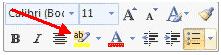
| 2. Click the Highlight Button on the Font Group of the Ribbon. |
| |
| You can also follow another method: |
| |
| 1. Select the text and right click on selected text, then select the highlight tool. |
| |
| 2. To change the color of the highlighter, click on “Down arrow” next to the highlight button. |
| |
 |
| |
| For Animated presentation Click here |
| |
| |
|
| |


