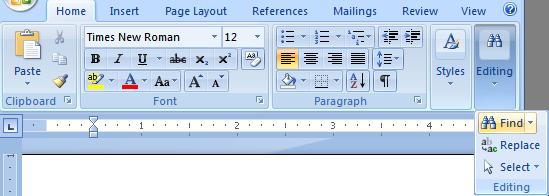
(ii) Select Editing
(iii) Click Find.
 |
 |
 |
| Revise your Word Document | |||
| Find (Search) & Replace your text | |||
| For use Find & replace option in Word-2007, follow these steps: | |||
| 1. Place your cursor at the start of your document. | |||
| 2.(i)Click on Home button (ii) Select Editing (iii) Click Find. |
|||
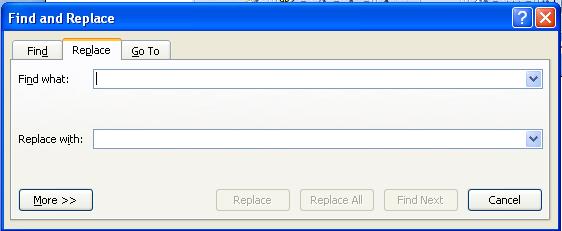
| The Find and Replace window opens. | |||
| 3. Select the Replace tab. | |||
| 4. Type the word or phrase that you want to find in the "Find what" box. | |||
| 5. Type the word or phrase you want to replace it with in the "Replace with" box. | |||
|
|||
| 6. Select more, for refine "Search option". | |||
| 7. Select Find Next or Replace if you want to manually replace each word or phrase. | |||
| 8. Select Replace All if you want Word to automatically search for and replace each instance of the word or phrase without first checking with you. | |||
| For Animated presentation Click here | |||
|
|||