WHERE S_id NOT IN
(SELECT S_id FROM Student_Sports)
WHERE S_id NOT IN (0012, 0013,0014, 0016)
 |
 |
 |
| SQL Advanced | |||
| Nested Queries | |||
| In this section we discuss nested queries and why they are used. | |||
| Nested Queries | |||
| A nested query is a query that 'NESTS' inside a query, implying a query residing inside another query. The nested queries are also termed as Subqueries. The statement/query containing/enclosing a subquery is called as he parent query. The parent query makes use of the rows/records returned by the sub query. | |||
| Subqueries are used: | |||
| • to create tables/views | |||
| • to insert records in a table | |||
| • to update records in a table | |||
| • to supply values in SELECT/UPDATE/DELETE statements where conditions are specified using clauses-WHERE, HAVING, IN etc | |||
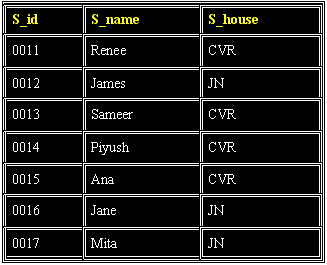
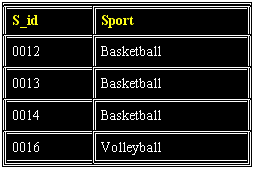
| To explain the subqueries further using examples we would be referring two tables-Student and Students_Sports as shown below: | |||
|
|||
| Student_Sports | |||
|
|||
| From the two tables above, suppose we want to retrieve the names of all students who do not play sports. | |||
| We key in the following query for that: | |||
| SELECT S_id, S_name FROM Student WHERE S_id NOT IN (SELECT S_id FROM Student_Sports) |
|||
| In the above statement the query within parenthesis is the subquery/nested query. A subquery is always executed first and its output provides the input for the parent query. Thus in the above example, subquery is executed first as shown below: | |||
| SELECT S_id FROM Student_Sports | |||
| The data retrieved by the above select statement will be passed to the WHERE CLAUSE of the parent query as in: | |||
| S_id NOT IN (0012, 0013,0014, 0016) | |||
| Thus the final query after replacing the inner queries with retrieved values will be: | |||
| SELECT S_id, S_name FROM Student WHERE S_id NOT IN (0012, 0013,0014, 0016) |
|||
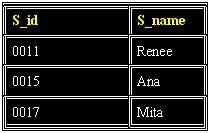
| Which will yield the following output: | |||
|
|||
| Lets take up a few examples, using some of the operators, that are commonly used with nested queries. | |||
|
|||