| SQL Advanced |
| |
| SQL SELECT INTO Statement |
| |
| The SELECT INTO Statement |
| The SELECT INTO statement is most often used to create backup copies of tables or for archiving records. |
| |
| Syntax |
| |
|
| |
| Make a Backup Copy |
| The following example makes a backup copy of the "Persons" table: |
| |
|
| |
| The IN clause can be used to copy tables into another database: |
| |
|
| |
| If you only want to copy a few fields, you can do so by listing them after the SELECT statement: |
|
| |
| You can also add a WHERE clause. The following example creates a "Persons_backup" table with two columns (FirstName and LastName) by extracting the persons who lives in "Sandnes" from the "Persons" table: |
| |
|
| |
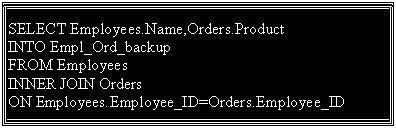
| Selecting data from more than one table is also possible. The following example creates a new table "Empl_Ord_backup" that contains data from the two tables Employees and Orders: |
| |
|
| |
| |
|
|
| |
| |