| Introduction to SQL |
| |
| Data Definition Language (DDL) |
| |
| SQL can be termed as a DDL i.e. Data Definition Language. The DDL part in SQL enables it to create/delete/alter a database table. Through this DDL feature indexes, links between tables as well as constraints can be defined. |
| |
| In this section we will be using commands that would enable us to CREATE, ALTER or DROP a database, table, index etc. This section also describes SELECT INTO which is used create a back up of a database table. |
| |
| The commands have been described with appropriate example one at a time covering all the clauses. |
| |
| |
| SQL Create |
| Create a Database |
| CREATE statement can be used to create a database. A database is nothing but a collection of tables which are related to each other. The inter-relation amongst the tables in a database is created by attributes/fields which may be common to more than one table. |
| |
| Syntax: |
| CREATE DATABASE database_name |
| |
| |
| Create Table |
| With CREATE TABLE; a new table can be created. A table can be considered as a basic structure within which data is stored. It consists of rows and columns. A row represents a single record while a column represents attributes/fields which can be thought of as one of the components contributing to make a record. While creating a table, data types have to be mentioned for each field. |
| |
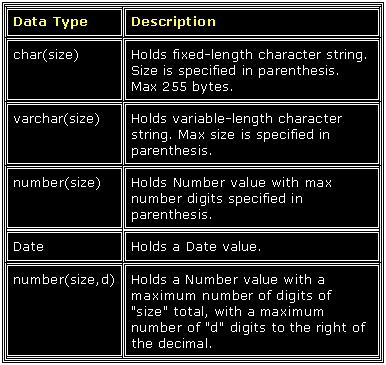
| Here are the most common Data Types: |
| |
|
| |
| The following statements/commands consist of DDL portion of SQL: |
| Create Table---- creates a new database table. |
| |
| Alter Table : alters a database table. |
| |
| Drop Table : deletes a database table. |
| |
| Create Index : creates an index. |
| |
| Drop Index : deletes an index. |
| |
| |
|
|
| |
| |