| Working With Graphics |
| |
| Inserting Smart Art |
| |
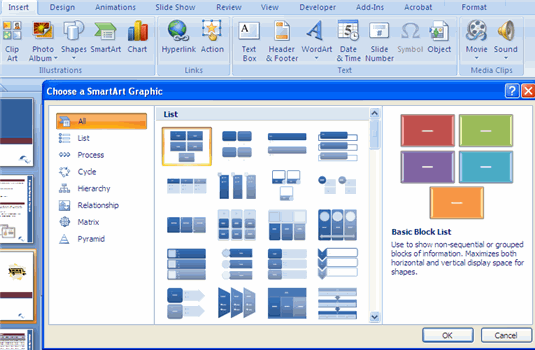
| SmartArt is a feature in Office 2007 that allows you to choose from a variety of graphics, including flow charts, lists, cycles, and processes. To insert SmartArt: |
| |
.	Click the Insert Tab
.	Click the SmartArt Button
.	Click the SmartArt you choose
|
| |
 |
| |
.	Click the SmartArt
.	Drag it to the desired location in the slide
|
| |
| To format the SmartArt: |
| |
.	Click the SmartArt
.	Click either the Design or the Format tab
.	Click the SmartArt to insert text and pictures.
|
| |
| For Animated presentation Click here |
| |
| |
|
| |
| |


