| Formatting Text |
| |
| Change Paragraph Alignment |
| |
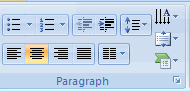
| The paragraph alignment allows you to set how you want text to appear. To change the alignment: |
| |
.	Click the Home Tab
.	Choose the appropriate button for alignment on the Paragraph Group.
|
| |
o	Align Left:  the text is aligned with your left margin
o	Center:  The text is centered within your margins
o	Align Right:  Aligns text with the right margin
o	Justify:  Aligns text to both the left and right margins.
|
| |
 |
| |
| Indent Paragraphs |
| |
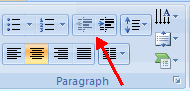
.	Click the Indent buttons to control the indent.
.	Click the Indent button repeated times to increase the size of the indent.
|
| |
 |
| |
| Text Direction |
| |
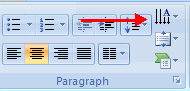
.	Select the text
.	Click the Text Direction button on the Home tab
.	Click the selection
|
| |
 |
| |
| For Animated presentation Click here |
| |
| |
|
| |
| |


