| Modifying a Content |
| |
| Select Text |
| |
| If you want to change any attributes of text it must be selected first. |
| |
| Select the text by dragging the mouse over the preferred text while keeping the left mouse button depressed. |
| |
| You can also hold down the SHIFT key on the keyboard while using the arrow buttons to highlight the text. |
| |
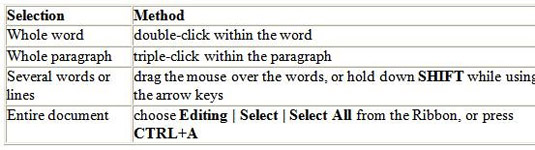
| The following table contains shortcuts for selecting a portion of the text in the PowerPoint 2007: |
| |
 |
| |
| You can deselect the text by clicking anyplace outside of the selection on the page or press an arrow key on the keyboard. |
| |
| For Animated presentation Click here |
| |
| |
|
| |


