<form enctype="multipart/form-data"
action="<?php echo $PHP_SELF;?>" method="POST">
<input type="hidden"
name="MAX_FILE_SIZE" value="100000" />
Choose a file to upload:
<input name="uploadedfile" type="file" /><br />
<input type="submit"
value="Upload File" name="submit" />
</form>
. action="uploader.php" - The name of our PHP page that will be created, shortly.
. method="POST" - Informs the browser that we want to send information to the server using POST.
. input type="hidden" name="MA... - Sets the maximum allowable file size, in bytes, that can be uploaded. This safety mechanism is easily bypassed and we will show a solid backup solution in PHP. We have set the max file size to 100KB in this example.
. input name="uploadedfile" - uploadedfile is how we will access the file in our PHP script.

<!DOCTYPE HTML PUBLIC "-//W3C//DTD HTML 4.0 Transitional//EN">
<HTML>
<HEAD>
<TITLE> PHP Tutorial: Working with File Upload </TITLE>
<META NAME="Generator" CONTENT="jNote-iT">

</HEAD>

<BODY>
<form name= "file_upload_form"
enctype="multipart/form-data" action="<?php echo $PHP_SELF;?>" method="POST">
<input type="hidden" name="MAX_FILE_SIZE" value="100000" />
Choose a file to upload: <input name="uploadedfile" type="file" /><br />
<input type="submit" value="Upload File" name="submit" />
</form>
<?php
if (isset($_POST['submit']))
{
echo "<hr><hr>";
	$filedir="c:/upload/";// of on Linux [/var/www/upload] etc
	$upload_file=$filedir.basenam
e($_FILES['uploadedfile']['name']) or die ("Unable to retrieve the file.");
	$tmp=$_FILES['uploadedfile']['tempname'];

	echo "<pre><b>";
	if (move_uploaded_file($_FILES['uploadedfile']['tempname'],$upload_file))
	{
		echo "\nFile ".$_FILES['uploadedfile']['name']." uploaded successfully";
	}
	else
		echo "Unable to upload file<b>".$tmp."</b>";
}
?>

</BODY>
</HTML>
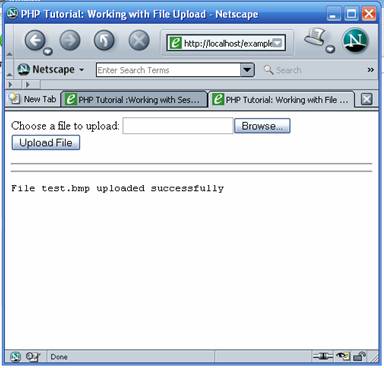
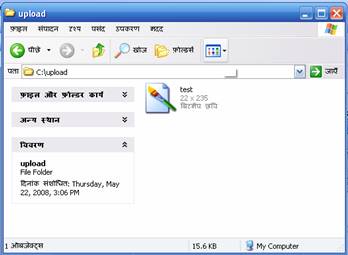
 |
 |
 |