| Session management and Cookie |
| |
| Error Handling |
| |
| Error handling in PHP is a fairly straightforward process. PHP will simply send to the browser (or standard output if executing a script from the command line).
* an error message containing relative information to the error such as the filename of the script, the specific line in the file that caused the error,
* a (sometimes) helpful message describing the nature of the error
The default error handling in PHP is very simple. An error message with filename, line number and a message describing the error is sent to the browser
|
| |
| Database functions can fail. There are several possible classes of failure, ranging from critical-the DBMS is inaccessible or a fixed parameter is incorrect to recoverable, such as a password being entered incorrectly by the user. |
| |
| The PHP interface functions to MySQL support two error-handling functions for detecting and reporting errors: |
| |
int mysql_errno(resource connection)
Returns the error number of the last error on the connection resource
string
mysql_error(resource connection)
Returns a descriptive string of the last error on the connection resource |
| |
| Example below shows a script illustrated with additional error handling. We have deliberately included an error where the name of the database test is misspelled as "test_tbl". |
| |
| The error handler is a function, showError( ), that-with the database name error-prints a phrase in the format: |
| |
| Error 1049 : Unknown database 'test_tbl' |
| |
| The error message shows both the numeric output of mysql_errorno( ) and the string output of mysql_error( ). The die( ) function outputs the message and then gracefully ends the script. |
| |
Warning:
The functions mysql_query( ) and mysql_unbuffered_query( ) return false only on failure; that is, when a query is incorrectly formed and can't be executed. |
| |
| A query that executes but returns no results still returns a result resource handle. However, a successive call to mysql_num_rows( ) reports no rows in the result set. |
| |
| The mysql_connect( ) and mysql_pconnect( ) functions don't set either the error number or error string on failure and so must be handled manually. This routine handling can be implemented with a die( ) function call and an suitable text message, as in Example below. |
| |
| Example Querying a database with error handling |
| |
<html>
<head>
  <title>PHP Tutorial: Working With MySQL</title>
</head>
<body><pre>
<?php

   function showError(  )
   {
      die("Error " . mysql_errno(  ) . " : " . mysql_error(  ));
   }

   // (1) Open a  connection to the database
   if (!($connection = @ mysql_connect("localhost",
                                       "roor","")))
      die("Could not connect");

   // NOTE : 'test' is deliberately misspelt to
   // cause an error
   if (!(mysql_select_db("test", $connection)))
      showError(  );

   // (2) Execute a  query on the test through the  connection

   if (!($result = @ mysql_query ("SELECT * FROM test_tbl",
                                   $connection)))
      showError(  );

   // (3) While there are still rows in the result set,
   // fetch the current row into the array $row
   while ($row = mysql_fetch_row($result))
   {
      // (4) Print out each element in $row, that is,
     // print the values of the attributes
      for ($i=0; $i<mysql_num_fields($result); $i++)
         echo $row[$i] . " ";

      // Print a carriage return to neaten the output
      echo "\n";
   }
   // (5) Close the database connection
   if (!mysql_close($connection))
      showError(  );
?>
</pre>
</body>
</html>
|
| |
| The MySQL error-handling functions should be used with the @ operator that suppresses default output of error messages by the PHP script engine. Omitting the @ operator produces messages that contain both the custom error message and the default error message produced by PHP. Consider an example where the string localhost is misspelled, and the @ operator is omitted: |
| |
if (!($connection = mysql_connect("localhos",
"root",:"") ))
die("Could not connect");
Warning: MySQL Connection Failed:
Unknown MySQL Server
Host 'localhos' (0) in error-handling.php on line 42
Could not connect |
| |
| TIPS: Don't forget to add an @ operator as the prefix to any function call that is handled manually with a custom error handler. The @ operator prevents PHP from issuing its own internal error message. |
| |
| Assignment: |
| |
| 1. In the sub-section MySQL DML command of this chapter, there are two dummy functions [update_record, delete_record] to implement update and delete operations respectively. Implement SQL Update and delete commands using the functions. |
| |
| 2. Write a PHP function to return list of databases as a drop-down list, i.e. |
| |
 |
| |
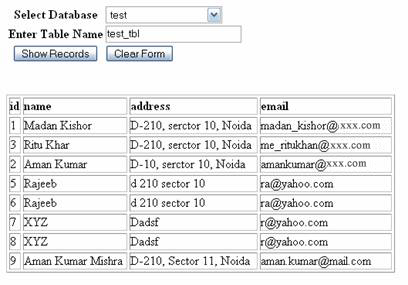
| 3. Write a PHP script to generate the following output: |
| |
 |
| |
| in the above script, there is a drop down list that contain name of all databases in MySQL. |
| |
| This Example work like this, when user select database name from drop-down list, enter desired table name in the text box and press Show Records button it should display the record in show format. |
| |
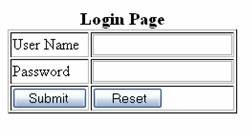
| 4. Implement simple login using PHP-MySQL, the login page should look like, the one given below: |
| |
 |
| |
| Create All necessary tables in MySQL and use JavaScript to ensure that form is not submitted when any of both fields are empty. Display appropriate Login Success/Login Failed message. |
| |
| |
|
| |
| |


