<?php
class employee_details {
}
?>
<?php
class employee_details{


	public function __construct($emp_id,$emp_name,$addr)
	{

		echo "Constructor Called with the following values<br>";
		echo "Employee ID = ".$emp_id."<br>E
mployee Name = ".$emp_name."<br>Address = ".$addr;

	}
	public function __distruct(){}
}
?>
<!DOCTYPE HTML PUBLIC "-//W3C//DTD HTML 4.0 Transitional//EN">
<HTML>
<HEAD>
<TITLE> PHP Tutorial: Working with Classes </TITLE>
<META NAME="Generator" CONTENT="jNote-iT">
</HEAD>

<BODY>
<?php
$emp=new employee_details("EMP0012","Aman Singh","B-320,
Sector 44, Rohni");
?>
</BODY>
</HTML>
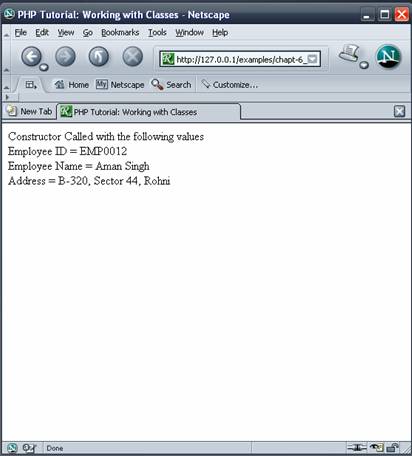
<?php
class employee_details{
	private $emp_id;
	private $emp_name;
	private $addr;

	public function __construct($emp_id,$emp_name,$addr)
	{
		$this->emp_id=$emp_id;
		$this->emp_name=$emp_name;
		$this->addr=$addr;
		echo "Constructor Called with following values:";
		echo "<br>Employee ID   : ".$this->emp_id;
		echo "<br>Employee Name : ".$this->emp_name;
		echo "<br>Address		: ".$this->addr;
	}
	public function __distruct(){}
}
?>
<!DOCTYPE HTML PUBLIC
 "-//W3C//DTD HTML 4.0 Transitional//EN">
<HTML>
<HEAD>
<TITLE> PHP Tutorials: Working with Classes </TITLE>
<META NAME="Generator" CONTENT="jNote-iT">
</HEAD>

<BODY>
<?php
$emp=new employee_details("EMP0012",
"Aman Singh","B-320, Sector 44, Rohni");
?>
</BODY>
</HTML>
<?php
class employee_details{
	private $emp_id;
	private $emp_name;
	private $addr;

	function __construct($emp_id,$emp_name,$addr)
	{
		$this->emp_id=$emp_id;
		$this->emp_name=$emp_name;
		$this->addr=$addr;
	}
	//Setter Methods of employee details class
	public function setEmpID($emp_id)
	{
		$this->emp_id=$emp_id;
	}
	public function setEmpName($emp_name)
	{
		$this->emp_name=$emp_name;
	}
	public function setEmpAddr($addr)
	{
		$this->addr=$addr;
	}
//getter Methods of employee details class
	public function getEmpID()
	{
		return $this->emp_id;
	}
	public function getEmpName()
	{
		return $this->emp_name;
	}
	public function getEmpAddr()
	{
		return $this->addr;
	}

	public function display_details()
	{
		echo "<br>Employee ID      : ".$this->emp_id;
		echo "<br>Employee Name : ".$this->emp_name;
		echo "<br>Address	     : ".$this->addr;
	}
}
?>
$emp2=new employee_details("","","");
//Using setter metter to set the employee details
$emp2->setEmpID("EMP0032");
$emp2->setEmpName("Neelam Rai");
$emp2->setEmpAddr("C-216/2,
Barakhamba Road, New Delhi");
<?php
require ("employee.class.php");
?>
<HTML>
<HEAD>
<TITLE> PHP Tutorials: Working with Classes </TITLE>
<META NAME="Generator" CONTENT="jNote-iT">
</HEAD>
<BODY>

<?php
$emp1=new employee_details("EMP0012",
"Aman Singh","B-320, Sector 44, Rohni");
$emp2=new employee_details("","","");
//Using setter metter to set the employee details
$emp2->setEmpID("EMP0032");
$emp2->setEmpName("Neelam Rai");
$emp2->setEmpAddr("C-216/2,
Barakhamba Road, New Delhi");
#Displaying Details of Employee 1
echo "<h3>Details of Employee 1</h3>";
$emp1->display_details();
#Displaying details of Employee 2
echo "<h3>Details of Employee 1</h3>";
$emp2->display_details();
echo "<br> <b> Name of Employee 2 is :
".$emp2->getEmpName()."</b>";
?>
</BODY>
</HTML>
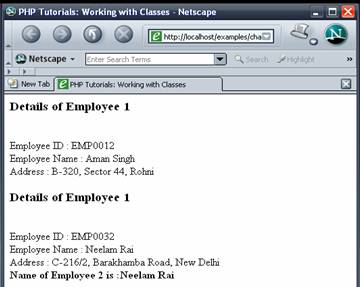
<?php
require ("employee.class.php");
	class tech_employee extends employee_details
	{
		private $dept;//Variable to store Department of the Employee
		private $team_id;//Variable to store Team ID of the employee
		private $prj_name;//Variable to store name
 of the Project employee is currently working on
		private $prj_role; // Variable t
o store Role of the employee in the project

		//other tech_employee
 specific processing logic, methods etc
	}
<?php
require ("employee.class.php");
	class tech_employee extends employee_details
	{
		private $dept;//Variable to store Department of the Employee
		private $team_id;//Variable to store Team ID of the employee
		private $prj_name; // Variable to store name o
f the Project employee is currently working on
		private $prj_role; // Variable to s
tore Role of the employee in the project

		public function __construct($emp_id, $e
mp_name,$addr,$dept,$team_id,$prj_name,$prj_role){
			echo "Calling Parent Constructor";
			parent::__construct($emp_id,$emp_name,$addr);
//Calling Parent Class Constructor with required Parameter
			$this->dept=$dept;
			$this->team_id=$team_id;
			$this->prj_name=$prj_name;
			$this->prj_role=$prj_role;
		}
		public function setDept($dept){
			$this->dept=$dept;
		}
		public function setTeam_id($team_id){
			$this->team_id=$team_id;
		}
		public function setPrjName($prj_name){
			$this->prj_name=$prj_name;
		}
		public function PrjRole($prj_role){
			$this->prj_role=$prj_role;
		}
		function getDept(){
			return $this->dept;
		}
		function getTeamId(){
			return $this->team_id;
		}
		function getPrjName(){
			return $this->prj_name;
		}
		function getPrjRole(){
			return $this->prj_role;
		}

		public function display_details(){
			parent::display_details(); //calling parent's display method
			#echo "<pre>";
			echo "<br>Employee Department: <b>".$this->dept."</b>";
			echo "<br>Team ID 		:
 <b>".$this->team_id."</b>";
			echo "<br>Current Project
		: <b>".$this->prj_name."</b>";
			echo "<br>Role in th
e Current Project:<b>".$this->prj_role."</b>";
		}

	}
?>
<?php
require ("tech_employee.class.php");
?>
<HTML>
<HEAD>
<TITLE> PHP Tutorials: Working with Classes </TITLE>
<META NAME="Generator" CONTENT="jNote-iT">
</HEAD>

<BODY>
<?php
	$emp3=new tech_employee("TECH0031","Ravish Kumar","D-410, S
ector 19, Noida","TECH-PHP","PHP03","EBIZ EDUCATION","PHP Developer");

	echo "<h3>Details of Employee 1[TECH EMPLOYEE]</h3>";
	echo "<pre>";
	$emp3->display_details();
	echo "</pre>";

?>
</BODY>
</HTML>
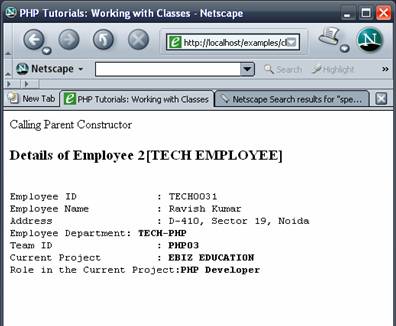
1. Create a PHP class Simple_class and implement "Hello World!" using hello function in Simple_class
2. In the above Class create another function helloTo, which accepts an argument e.g. name and display "Hello :)".name.
3. Create a class Simple_calculator and implement Add & Subtract operation using member functions. Both functions should accept two arguments and return the result.
4. Create a class Adv_calculator which extends the Simple_calculator and contain three member function multi(), modulo() & division() besides the parent class methods. Call all 5 functions using object of Adv_calculaor.
5. Write a PHP Script to print a list of classes the script has access of. 6. Write PHP Script to check whether a method exists or not.
 |
 |
 |