| PHP Functions |
| |
| File inclusion functions |
| |
| include function |
| |
| INCLUDE is used in PHP to append the code from an external file into the current file. |
| |
| The syntax for INCLUDE is |
| |
| INCLUDE ("external_file_name"); |
| |
| This is a convenient feature for a large website. Often, we may want to change an element of the website that is consistent across the entire site, yet we don't want to go through the trouble of updating every single file. In this case, we can simply use INCLUDE in every file to call the same external file, and then all we need to change is the content in that one external file. |
| |
| Let's look at a simple example. |
| |
| Assuming we have the following three files: |
| |
| main.php |
| |
<html xmlns="http://www.w3.org/1999/xhtml">
<head>
<meta http-equiv="Content-Type" content="text/html; charset=iso-8859-1" />
<title>PHP Include</title>
</head>

<body>
<table width="100%" border="0" cellspacing="3" cellpadding="0">
  <tr>
    <td width="18%"> </td>
    <td width="72%"> </td>
    <td width="10%" rowspan="2"> </td>
  </tr>
  <tr>
    <td rowspan="2"><?php
    include ("menu.php");
    ?>
    </td>
    <td><BR><BR><BR><BR><BR><BR><BR><BR><BR><BR><BR></td>
  </tr>

  <tr>

  <?php
  #Footer
  include ("footer.php");
  ?>

    <td> </td>
  </tr>
</table>
</body>
</html>
|
| |
| 2. menu.php |
| |
<?php
#External PHP Menu
?>
<table width="100%" border="0" cellspacing="3" cellpadding="0">
  <tr>
    <td><A HREF="http://www.ebizelindia.com">eBIZ.com Home</A></td>
  </tr>
  <tr>
    <td><A HREF="http://education.ebizelindia.com">eBIZ Education</A></td>
  </tr>
  <tr>
    <td><A HREF="http://mail.ebizelindia.com">Mail</A></td>
  </tr>
  <tr>
    <td><A HREF="mailto:support@ebizelindia.com">Contact US</A></td>
  </tr>
</table>
|
| |
| 3. Footer.php |
| |
<td style="background-color:#0099FF; text-align:center">
<p style=" font-family:Verdana, Arial, Helvetica, sans-serif; color:#ffccFF; size:14; font-weight:700">© eBIZ.com Pvt. Ltd.</p></td> |
| |
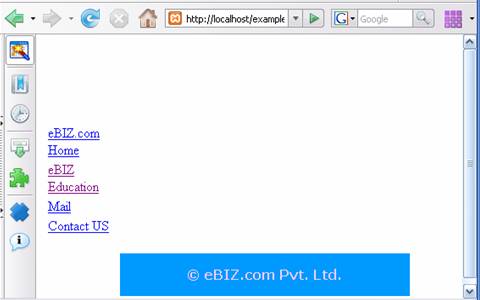
| Upon executing main.php, we'll get the following output: |
| |
|
 |
| |
| This is because, to the web server, it sees these three scripts as single script. |
| |
| require function |
| |
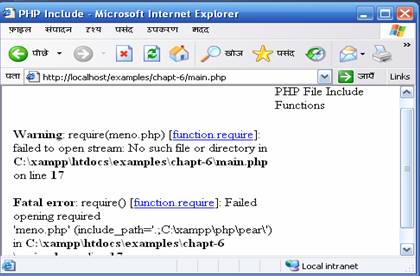
| Both include & require constructs are identical in every way except how they handle failure. include() produces a Warning on the other hand require() results in a Fatal Error. In other words, use require() if you want a missing file to halt processing of the page and use include otherwise. |
| |
| Syntax: |
| |
| require ("external_file"); |
| |
| We can use require in our previous example in place of include or vice versa. |
| |
| Now, suppose we are using require instead of include to include menu.php and we misspelled its name as meno.php, then it will produce the following error: |
| |
<?php
    require ("meno.php");
 ?>
|
 |
| |
| include_once and require_once functions |
| |
| include_once |
| |
| The behavior of include_once is similar to the include () statement, that is, include_once() statement includes and evaluates the specified file during the execution of the script. The difference being that if the code from a file has already been included, include_once will not be included again. As the name suggests, it will be included just once. |
| |
| require_once |
| |
| The require_once() statement includes and evaluates the specified file during the execution of the script. The only difference between require & require_once is that if the code from a file has already been included, it will not be included again. |
| |
| Assignment |
| |
1. Create a Multi file [at least 5(1 main 4 sub)] PHP script and use all file inclusion functions to include them to main script.
2. Write a PHP script to print a countdown (10,9.. ..1) using function.
3. Write a PHP Script to print Square of all numbers from 1-10 using loop using function.
4. Write a PHP function to calculate and return sum of all even numbers between 1-50.
Remember function should not print the output by itself, rather it should return a value.
5. Create a function hello which accepts name as argument and print "Hello XYZ", where XYZ is the value of the argument passed to the function. |
| |
| |
|
| |
| |


