There are three types of operators. Firstly there is the unary operator which operates on only one value, for example ! (the negation operator) or ++ (the increment operator). The second group are termed binary operators; this group contains most of the operators that PHP supports.The third group is the ternary operator: ?:. It should be used to select between two expressions depending on a third one, rather than to select two sentences or paths of execution. Surrounding ternary expressions with parentheses is a very good idea.
The most common PHP operators are assignment operators, arithmetic operators, combined operators, comparison operators, and logical operators. Each type is discussed separately below.Operator |
Description |
Example |
Result |
+ |
Addition |
$x=2+2 |
4 |
- |
Subtraction |
x=2 |
3 |
* |
Multiplication |
x=4 |
20 |
/ |
Division |
15/5 |
3 |
% |
Modulus (division remainder) |
5%2 |
1 |
|
|
|
|
|
|
|
|
Operator |
Example |
Is The Same As |
= |
x=y |
x=y |
+= |
x+=y |
x=x+y |
-= |
x-=y |
x=x-y |
*= |
x*=y |
x=x*y |
/= |
x/=y |
x=x/y |
.= |
x.=y |
x=x.y |
%= |
x%=y |
x=x%y |
Operator |
Description |
Example |
== |
is equal to |
5==8 returns false |
!= |
is not equal |
5!=8 returns true |
> |
is greater than |
5>8 returns false |
< |
is less than |
5<8 returns true |
>= |
is greater than or equal to |
5>=8 returns false |
<= |
is less than or equal to |
5<=8 returns true |
Operator |
Description |
Example |
&& |
and |
x=6 |
|| |
or |
x=6 |
! |
not |
x=6 |
Operator |
Type |
Description |
Equivalent |
++$var |
Preincrement |
Increments the variable value before it is used in rest of expression |
$var = 10; |
--$var |
Predecrement |
Decrements the variable value before it is used in rest of expression |
$var = 10; |
$var++ |
Postincrement |
Increments the variable value after it is used in rest of expression |
$var = 10; |
$var-- |
Postdecrement |
Decrements the variable value after it is used in rest of expression |
$var = 10; |
<!DOCTYPE HTML PUBLIC "-//W3C//DTD HTML 4.0 Transitional//EN">
<HTML>
<HEAD>
<TITLE> PHP Operators </TITLE>
</HEAD>

<BODY>
<h2>PHP Operators </h2>
<HR>
<FIELDSET>
<LEGEND>
<span style="background-color: #3399CC; color:
 #F7F7F7;font-weight: bold">
Arithmetic Operators Example</span></LEGEND>
<pre>
<?php
	#$x,$y,$result;
	$x=10;
	$y=20;
	//addition operator
	$result=$x+$y;
	//substraction operator
	echo "$x + $y =$result";
	$result=$x-$y;
	echo "<br>$x - $y =$result";
	//Multiplication operator
	$result=$x*$y;
	echo "<br>$x * $y =$result";
	//division operator
	$result=$x/$y;
	echo "<br>$x / $y =$result";
	$result=$x%$y;
	echo "<br>$x % $y =$result";

?>
</pre>
</FIELDSET><BR>
<FIELDSET>
	<LEGEND><span style="background-color: #3399CC;

 color: #F7F7F7;font-weight: bold">A
ssignment Operator EXAMPLE </span></LEGEND>
<pre>
<?php
	#$x,$y,$result;
	$x=10;
	$y=20;
	//addition operator


	echo "$x +=$y:   ";
	$x+=$y;
	echo "$x";

	//substraction operator
	echo "<br>$x -=$y:   ";
	$x-=$y;
	echo "$x";
	//Multiplication operator

	echo "<br>$x *=$y   :";

	echo "<br>$x /=$y: ". ($x/=$y);
	//division operator
	#$result=$x/$y;

?>
</pre>
</FIELDSET></BODY>
</HTML>
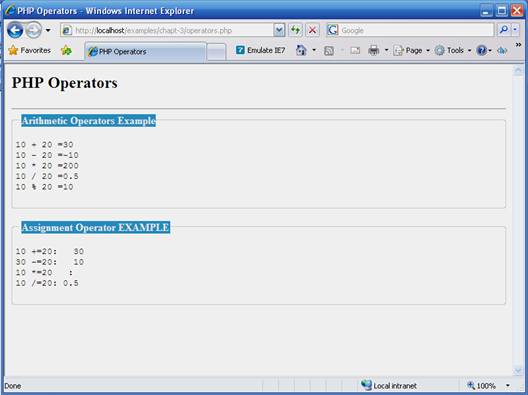
 |
 |
 |