| Replication & Other Administration issues |
| |
| Building Replication Plan |
| |
| Replication makes it possible to synchronize two or more MySQL servers running on different computers.
Different database systems employ differing methods of establishing replication. If you are familiar with replication from another database system, you should not expect MySQL to exhibit the exact same properties. |
| |
| MySQL currently supports master/slave replication exclusively. There is one master system (read/write). This system is responsible for all changes to data. Additionally, there are one or more slave systems (read-only) on which, perhaps after abrief delay, exactly the same data are available as on the master system. |
| |
| The exchange of data between the master and slaves is accomplished via binary logging files belonging to the master. The slaves remain in contact with the master and synchronize their databases by taking the requisite SQL commands from the logging files. |
| |
| Replication functions even when the computers are running under different operating systems. (For example, the master can be running under Linux and a slave under Windows.) |
| |
|
Pointer |
In addition to the information of this section, in Chapter 18 you will find a reference to all SQL commands for running replication (Chapter 18 provides an overview), and in Chapter 19 there is a reference to all mysqld options related to replication.
Further information can be found in the MySQL documentation, the section "Replication in MySQL":
http://www.mysql.com/doc/en/Replication.php |
|
| |
| Why Replication? |
| |
| There are two reasons that argue in favor of setting up a replication system: security and speed. |
| |
| Security |
| |
| Thanks to replication, your database is available on several computers. If a slave computer goes off line, the entire system can continue to run without interruption. (A new slave system can later synchronize itself.)
If the master computer goes off line, then the preservation of the data can be taken over by a slave computer. Alternatively, the entire system can be reconfigured so that a slave computer takes over the role of the master. In either case, though, the entire system is available as read-only. |
| |
| If you are considering replication for reasons of security only, you should also consider a RAID system, whereby the contents of two (or more) hard drives are synchronized. A RAID system, however, protects only against a hard-drive crash, and not against an operating system crash, power outage, or the like. |
| |
| Note that replication can also be used as a substitute for conventional backups. (Thanks to replication, the backup is always current. If you also require a conventional backup, you can execute it on the slave computer without involving the master computer.) |
| |
| Speed |
| |
| If the speed of a database system is limited primarily by many read-only queries (and not by a large number of alterations to the data), then a replication system can gain you great savings in time: The expensive queries are divided among several slave systems, while the master system is used exclusively or primarily for updates. (Of course, part of the theoretical increase in speed is lost due to the increased communication overhead.) |
| |
| Please note that you can gain speed only if the programming of the client is compatible with your system. The client programs must divide your queries according to a load-balancing procedure (or simply at random) among all available slave systems. MySQL itself provides no mechanism for this purpose. |
| |
| If your interest in replication is motivated by performance problems, you should consider alternative performance-enhancing measures, in particular, better hardware (in the following order: more RAM, faster hard drive, a RAID system, a multiprocessor system). |
| |
| Limitations |
| |
| . MySQL currently supports replication only in the form of a master/slave system (one-way replication). All changes in data must be carried out on a single master system. The slave systems can be used only for database queries (read-only). |
| |
| It is not currently possible for a slave system to take over the role of the master automatically if it should go out of service (fail-safe replication). Thus replication can produce a system that is secure against breakdowns for database queries, but not for alterations to the data. Fail-safe replication is planned for MySQL 5.0. |
| |
| It is also impossible to synchronize changes to several systems (multiple-master replication). That would lead to problems with AUTO_INCREMENT values. It is therefore impossible, for example, to execute changes in a MySQL database on a notebook computer and later bring these into balance with the master system on another computer. |
| |
| . The replication system does not work properly with several SQL commands: |
| |
o RAND:
In MySQL 3.23, random numbers generated with RAND cannot be replicated. Every copy of the data contains a different value. To circumvent this problem, you may use RAND(n), where n is a pseudorandom parameter of the current timestamp value of your client program. Starting with MySQL 4.0, replication works with RAND( ) even without a parameter. ? |
| |
o User variables:
In MySQL 4.0, SQL commands that contain their own variables (@varname) are not correctly replicated. This restriction will be removed with version 4.1. ? |
| |
o LOAD DATA INFILE:
Data balancing works only if the imported file on the server is available during replication. |
| |
| . It is desirable that the same MySQL version be running on both master and slave computers. Replication generally functions correctly when the version number of the slave is higher than that of the client. |
| |
| . On master and slave systems the same character set should be used (setting default-character-set). |
| |
| Setting Up the Replication Master System |
| |
| This section describes the preparatory work for setting up a replication system on the master computer. Note, please, that this introduction does not show the only way to proceed. There are even several ways for transferring the start data to the slave. (One variant will be shown a bit later in this chapter.) |
| |
| This section and the next assume that the database mysql, too, is to be replicated with its access privileges. This is usually a good idea, so that all users who are permitted to read data from the master system will be able to read data from the slaves with the same access information. |
| |
| This method of proceeding is, however, burdened with some drawbacks. Everyone who is permitted to change the master is now permitted to do the same to the slaves. However, changes to data should fundamentally be made to the master, for otherwise, replication falls apart. If you thus wish to exclude data alteration on the slaves, you (as database administrator) must exclude the mysql database from replication (binlog-ignore-db=mysql), and instead, manage the mysql databases separately for the master and all of the slaves. However, that causes synchronization problems. For example, if a user obtains a new password on the master, the changed password must be entered on all the slaves. |
| |
| Setting Up the Replication User |
| |
| The first step consists in setting up a new user on the master system that is responsible for communication between master and client. The user name is irrelevant, and in this section we will use the name replicuser. |
| |
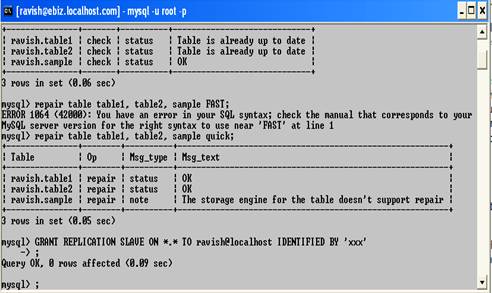
| This user requires the Replication Slave privilege for access to the binary logging files. Instead of slavehostname, specify the complete computer name or IP number of the slave computer. For security reasons you should use as password a combination of characters that is in use neither in the operating system nor in the database: |
| |
| GRANT REPLICATION SLAVE ON *.* TO replicuser@slavehostname IDENTIFIED BY 'xxx' |
| |
 |
| |
| If youhave in mind to use the commands LOAD TABLE FROM MASTER and LOAD DATA FROM MASTER, then you must also grant replicuser the privileges Select, Reload, and Super. These commands are conceived primarily as aids for the MySQL developer and experts; they can help in setting up and managing a replication system. |
| |
| If the replication system is to have several slaves, then you must execute GRANT for all the slave computers. Alternatively, you can permit access for all computers in the local system (e.g., replicuser@'%.netname'). This can simplify administration, though at the cost of introducing an unnecessary security risk. |
| |
| On the slave system, test whether it is possible to establish a connection. (This has only the effect of ruling out possible errors that have nothing to do with replication.) |
| |
| Shutdown |
| |
| In setting up the slave you must specify the position in the logging files at which the slave is to begin reading. You can determine this position with the following command: |
| |
FLUSH TABLES WITH READ LOCK
SHOW MASTER STATUS
 File            Position Binlog_do_db  Binlog_ignore_db
-----------------------------------------------------------
 ebizel-bin.005  79
|
| |
| You must note the information from the first two columns (file and position). If SHOW MASTER STATUS returns no result (empty set), then binary logging is not yet activated.
Next, the MySQL server must be shut down, for example, with mysqladmin shutdown or /etc/init.d/mysql stop), or under Windows, WinMySQLadmin. |
| |
| Creating a Snapshot |
| |
| Now you create a copy (called a snapshot) of all the databases. You will need this snapshot for the installation of the initial state of all the databases on the slave computers.
Under Windows use WinZip or another compression program; under Unix/Linux your best bet is to use tar. (If you have enough space on your hard drive, you may simply copy the database directory to another location.) |
| |
root# cd mysql-data-dir
root# tar czf snapshot.tgz database1/ database2/ database3/ |
| |
| With tar you cannot, unfortunately, use * to include all databases, because in the MySQL database directory there are usually many logging files that should not be installed on the slave system. |
| |
| Under windows you can simply copy ur Data Directory to another location. |
| |
| Server Configuration |
| |
| In order for the MySQL server to be able to function as a replication master, you must associate a unique ID number with the server, using the option server-id. (Every computer in the replication system must be so designated.) Moreover, you must activate binary logging with the option log-bin if that has not yet been accomplished: |
| |
# master configuration
#in /etc/my.cnf or windows\my.ini
[mysqld]
log-bin
server-id=1
|
| |
| Then restart the server. (You can again use the server in normal fashion. All changes to the database will now be recorded in the binary logging file. As soon as a slave system goes on line, it will automatically synchronize its database based on the logging files.) |
| |
| Setting Up the Replication Slave System |
| |
| Setting Up the Databases (Snapshot) |
| |
| If the MySQL server is already using replication that is no longer to be used but is to be replaced by a new configuration, then execute RESET SLAVE. With this, the server forgets the old replication configuration.
Now stop the slave server. If there were already databases there, move their files into a backup directory (better safe than sorry). |
| |
| Then copy the database files of the snapshot into the database directory with WinZip or tar xzf). Make sure that the files can be read and written by the MySQL server. Under Unix/Linux you do this by executing chown -R mysql.mysql (Red Hat) or chown -R mysql.daemon (SuSE). |
| |
| Configuration File |
| |
| With the slave system as well, the configuration file must be changed a bit. With server-id each slave system also obtains a unique identification number. With master-host, master-user, and master-password you specify how the slave system is related to the master: |
| |
# slave configuration
#in /etc/my.cnf or windows\my.ini
[mysqld]
server-id=2
default-character-set =
innodb_xxx =
|
| |
| Now the slave system can be brought on line. Start the server. If problems arise, look at the error log (file hostname.err). |
| |
| Starting Replication |
| |
| To start replication between slave and master, execute the following command. The slanted text should be replaced by the configuration data of the master: |
| |
CHANGE MASTER TO
    MASTER_HOST =     'master_hostname',
    MASTER_USER =     'replication user name',
    MASTER_PASSWORD = 'replication password',
    MASTER_LOG_FILE = 'log file name',
    MASTER_LOG_POS =  log_offset
|
| |
| If the master is running on the computer ebizel.log and all other specifications are the same as those of the previous section, then the command would look like this: |
| |
CHANGE MASTER TO
    MASTER_HOST =     'ebizel.sol',
    MASTER_USER =     'replicuser',
    MASTER_PASSWORD = 'xxx',
    MASTER_LOG_FILE = 'ebizel-bin.005',
    MASTER_LOG_POS = 79
|
| |
| If binary logging was not instituted before replication was set up, then specify MASTER_LOG_FILE = '' and MASTER_LOG_POS = 4. |
| |
| First Test |
| |
| With mysql create a connection to the master system and add a new data record to the table of your choice. Then use mysql to establish a connection to a slave system and test whether the new record appears there. If that is the case, then rejoice, for your replication system is working already. (Of course, you could also generate and then delete new tables and even entire databases. The slave system understands and carries out these commands as well.) |
| |
| Take a look, too, into the logging file hostname.err on the slave system. There you should see entries on the status of the replication, for example in the following form: |
| |
| 030319 14:11:57 Slave I/O thread: connected to master
'replicuser@ebizel.sol:3306', replication started in log
'ebizel-bin.005' at position 79 |
| |
| As a further test you can shut down the slave system, make changes in the master system, and then start up the slave system again. The databases on the slave system should be automatically synchronized within a couple of seconds. |
| |
| Setting Up a Replication System with LOAD DATA |
| |
| Areplication system can be set up much more easily if one makes use of the command LOAD DATA FROM MASTER.A couple of conditions must be satisfied first: |
| |
| . On the master, MyISAM tables must be used exclusively. (In MySQL 4.0.12, LOAD DATA does not work with InnoDB tables. This should change in future versions, but there is no concrete information in the MySQL documentation as to when that might be.) |
| |
| . The mysql database should not be replicated. (LOAD DATA ignores the mysql database. Therefore, this database must already exist on the slave system.) |
| |
| . The MySQL configuration file of the master should contain log-bin and a unique server-id setting. |
| |
| . The MySQL configuration file of the slave should also contain log-bin and a unique server-id setting. |
| |
Master:
If these conditions are satisfied, then setting up the replication system is child's play. You set up the replication user on the master, to which you grant the privileges Select, Reload, and Super: |
| |
| GRANT SELECT, RELOAD, SUPER, REPLICATION SLAVE ON *.*
TO replicuser@slavehostname IDENTIFIED BY 'xxx' |
| |
| If the databases on the master are already filled in, then the variables net_read_timeout and net_write_timeout should have their values increased. (The default value is 20. The variables should be reset to the default after the replication system has been set up.) |
| |
SET GLOBAL net_read_timeout=600
SET GLOBAL net_write_timeout=600 |
| |
Slave:
On the slave, set the host name and user name and password for the replication process: |
| |
CHANGE MASTER TO
MASTER_HOST = 'ebizel.sol',
MASTER_USER = 'replicuser',
MASTER_PASSWORD = 'xxx' |
| |
| On the slave as well, net_read_timeout and net_write_timeout should be increased: |
| |
SET net_read_timeout=600
SET net_write_timeout=600
MASTER_USER = |
| |
The following command transfers all the databases and tables from master to slave and starts the replication system: |
| |
| LOAD DATA FROM MASTER |
| |
| If an error occurs in executing this command, then life becomes complicated: You must stop the slave server, delete all (partially) transferred database directories, and then begin again. Possible sources of the problem are too-small values of net_read_timeout and net_write_timeout (from master and/or slave) as well as the presence of InnoDB tables. LOAD DATA FROM MASTER looks at the configuration settings replicate_ignore_xxx, with which individual tables or entire databases can be excluded from replication. |
| |
| Replication Viewed from Inside |
| |
| The master.info file |
| |
| At the initial startup of replication, the slave system will have the file master.in added to its database directory. In this file MySQL keeps track of which binary logging file is currently being used, to what point this file has been evaluated, how the master can be contacted (host name, user name, password), etc. This file is absolutely necessary for the operation of replication. The MySQL documentation naturally emphatically recommends that you not mess around with this file: |
| |
ebizel-bin.007
265
ebizel.sol
replicuser
ebizel
3306
60
|
| |
| relay Files (Slave) |
| |
| Once replication is running on the slave computer, the files relay-log.info, hostname-relay-bin.index, and hostname-relay-bin.nnn appear in the data directory. These files are created by a separate IO thread (subprocess) on the slave server, using a copy of the binary logging files on the master. The sole task of the IO thread is to copy these data from master to slave. A second SQL thread then executes the SQL commands contained in the logging files. |
| |
| Excluding Databases and Tables from Replication |
| |
| If you do not want all of the databases or tables of the master replicated, there are two ways of excluding some of them: You can exclude databases from logging in the master configuration file (binlog-ignore-db), or you can exclude databases and tables from replication in the slave configuration file (replicate-ignore-table, replicate-wild-ignore-table, replication-ignore-db). |
| |
| Excluding Replication Temporarily (Master) |
| |
| If you wish to execute an SQL command on the master that is not to be replicated on the slave, then first execute the command SQL_LOG_BIN=0 and then the command SET SQL_LOG_BIN=1.(For this, the Super privilege is necessary.) |
| |
| Ending the Master and Slave Servers |
| |
| Master and slave servers run independently of each other, and they can be stopped and restarted independently and in either order without loss of data. If the slave is unable to make a connection to the master, or to reconnect, then it attempts a connection every sixty seconds. As soon as the connection is reestablished, all outstanding changes are read from the binary logging files and executed on the slave. This works even if the slave was down for a long time and has a great deal of catching up to do. |
| |
| Several Slaves, Replication Chains |
| |
| One may have an arbitrary number of slaves, all accessing the same master. From the master's point of view, nothing is different (except for the additional burden of accesses).
In addition, MySQL offers the possibility of creating replication chains of the form A --> B --> C . Here B would be a slave with respect to A, but a master with respect to C. This generally increases the overhead and is therefore not worthwhile. However, a possible scenario is a slow network connection between A and B (say, one server is in Europe and the other in the USA) and a fast connection between B and C. On computer B, the configuration log-slave-updates must be used. |
| |
| Replication and Transactions |
| |
| Transactions are not executed on the slave systems until they have been terminated on the master by COMMIT. On the other hand, if a transaction on the master is terminated by ROLLBACK, then the affeced SQL commands are neither logged in the logging files nor executed on the slave system. |
| |
| It is even possible to use a transaction-capable table format (InnodB) on the master system, while using an ordinary MyISAM table on the slave. Since transaction management takes place entirely on the master, it is unnecessary to have slave support on the slave. |
| |
| However, it is necessary to have the slave properly set up before replication begins. (If the tables in the start state come from a file snapshot, then they are in the same format as those of the master and must be explicitly transformed on the slave to MyISAM tables. Note that changes in the format of a table are replicated from master to slaves.) |
| |
| |
| |
| |
| |


