| Advanced MySQL Administration |
| |
| Data Recovery & Repair |
| |
| Database damage occurs for a number of reasons and varies in extent. If you're lucky, you may simply have minor damage to a table or two (for example, if your machine goes down briefly due to a power outage). In this case, it's likely that the server can repair the damage when it comes back up. If you're not so lucky, you may have to replace your entire data directory (for example, if a disk died and took your data directory with it). Recovery is also needed under other circumstances, such as when users mistakenly drop databases or tables or delete a table's contents. Whatever the reason for these unfortunate events, you'll need to perform some sort of recovery: |
| |
| . If tables are damaged but not lost, try to repair them using the CHECK TABLE statement or with the mysqlcheck or myisamchk utilities. You may not need to resort to using backup files at all if the damage is such that a repair operation can fix it. |
| |
| . If tables are lost or irreparable, you'll need to restore them. |
| |
| The first part of this section describes table checking and repair procedures you can use to deal with more minor forms of damage. This includes interactive procedures to be used as needed and non-interactive procedures to be used for setting up scheduled preventive maintenance. The second part of the section discusses how to recover tables and databases if you lose them entirely or they are damaged beyond repair. |
| |
| Checking and Repairing Database Tables |
| |
| If you suspect that table corruption has occurred, the general procedure for damage detection and correction is as follows: |
| |
| 1. Check the table for errors. If the table checks okay, you're done. If not, you must repair it. |
| |
| 2. Make copies of the table files before beginning repair, just in case something goes wrong. That is unlikely, but if it happens, you can make a new copy of the table from the copied files and try a different recovery method. |
| |
| 3. Try to repair the table. If the repair operation succeeds, you're done. If not, restore the table from your database backups and update logs. |
| |
| The final step of this procedure assumes that you've been performing database backups and have binary update logging enabled. If that's not true, you're living dangerously. Read the discussion earlier in this chapter that describes how to make backups. |
| |
| You can check or repair tables by using myisamchk, which operates on the table files directly. Or you can tell the server to check or repair tables using the CHECK TABLE or REPAIR TABLE statements (or by using mysqlcheck, which connects to the server and issues these statements for you). An advantage of using the SQL statements or mysqlcheck is that the server does the work for you. If you run myisamchk, you must ensure that the server stays away from the table files while you're working on them. |
| |
| Repairing Tables with myisamchk |
| |
| Table repair is an ugly business, made more so by the fact that the details tend to be very incident-specific. Nevertheless, there are general guidelines and procedures you can follow to significantly increase your chances of being able to fix the tables. Generally, you begin with the fastest repair method to see if that will correct the damage. If you find that it is not sufficient, you can escalate to more thorough (but slower) repair methods until either the damage has been repaired or you cannot escalate further. |
| |
| (In practice, most problems are fixable without going to more extensive and slower repair modes.) If the table cannot be repaired, you'll need to restore the table from your backups. Instructions for recovery using backup files and log files are given later in this chapter. |
| |
| To perform a standard repair operation on a table, use the following procedure: |
| |
| 1. Try to fix the table using the --recover option, and use the --quick option as well to attempt recovery based only on the contents of the index file. This will repair the table without touching the data file: |
| |
| 2. % myisamchk --recover --quick tbl_name |
| |
| 3. If problems remain, rerun the command without the --quick option to allow myisamchk to go ahead and modify the data file, too: |
| |
| 4. % myisamchk --recover tbl_name |
| |
| 5. If that doesn't work, try the --safe-recover repair mode. This is slower than regular recovery mode, but is capable of fixing a few problems that --recover mode will not: |
| |
| 6. % myisamchk --safe-recover tbl_name |
| |
| It's possible when you run these commands that myisamchk will stop with an error message of the form Can't create new temp file: file_name. If that happens, repeat the command and add the --force option to force removal of the temporary file that may have been left around from a previous failed repair attempt. |
| |
| Checking and Repairing Tables Using the Server |
| |
| The CHECK TABLE and REPAIR TABLE statements provide a SQL interface to the server's table checking and repair capabilities. They work for MyISAM tables. As of MySQL 3.23.39, CHECK TABLE also works for InnoDB tables. |
| |
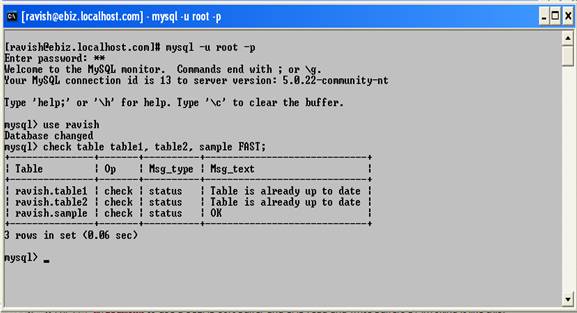
| For each statement, you provide a list of one or more table names followed by options to indicate what type of check or repair mode to use. For example, the following statement performs a medium level check on three tables, but only if they have not been properly closed: |
| |
| CHECK TABLE sample, table1, table2 FAST MEDIUM; |
| |
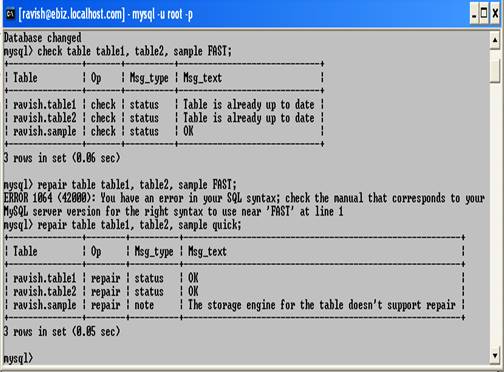
| The following statement tries to repair the same tables in quick repair mode: |
| |
| REPAIR TABLE sample, table1, table2 QUICK; |
| |
| CHECK TABLE allows the following options to specify what type of check to perform: |
| |
. CHANGED
Don't check tables unless they were not properly closed or have been changed since the last time they were checked. |
| |
. EXTENDED
Perform an extensive check. This is the most thorough check available and consequently the slowest. It attempts to verify that the data rows and the indexes are fully consistent. |
| |
. FAST
Don't check tables unless they were not properly closed. |
| |
. MEDIUM
Perform a medium-level check. This is the default if you specify no options. |
| |
. QUICK
Perform a quick check that scans only the index rows. It does not check the data rows. |
| |
| It's possible that CHECK TABLE will actually modify a table in some cases. For example, if a table was marked as corrupt or as not having been closed properly but the check finds no problems, CHECK TABLE will mark the table as okay. This change involves only modifying an internal flag. |
| |
 |
| |
| REPAIR TABLE allows the following options to specify the repair mode: |
| |
. EXTENDED
Attempt a repair by recreating the indexes. (This is like using the --safe-recover option with myisamchk.) |
| |
. QUICK
Attempt a quick repair of just the indexes. |
| |
. USE_FRM
Attempt a repair using the table's .frm description file. The repair recreates the index based on the table description. Essentially, it automates the procedure described earlier that uses the .frm file to rebuild the index from the table description under circumstances when the index file is missing or unusable, and this can be useful if the index has been lost or corrupted. This option was introduced in MySQL 4.0.2. |
| |
 |
| |
| With no options, REPAIR TABLE performs a standard repair operation like that done by myisamchk--recover. |
| |
| The mysqlcheck utility provides a command line interface to the CHECK TABLE and REPAIR TABLE statements. This program connects to the server and issues the appropriate statements for you based on the options you specify. |
| |
| |
|
|
| |
| |


