2. Create an entity bean for the AccountEJB class.
3. Add the entity bean to the J2EE application.
4. Set the display name for the entity bean to AccountBean.
5. Create the ACCOUNT database table.
 |
 |
 |
| JSP Components | |||
| Setting Up the JSP Component's J2EE Application | |||
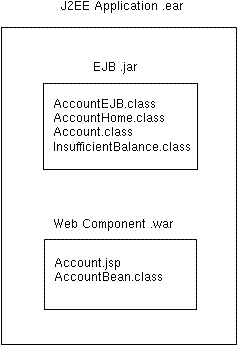
| The following figure shows the J2EE application that contains the JSP component. | |||
| Stored in a .ear file, the J2EE application holds an EJB .jar file and a web component .war file. | |||
| The EJB .jar file contains the AccountEJB entity bean. | |||
| The .war file contains the JSP component (Account.jsp) and the JavaBeans component (AccountBean). | |||
|
|||
| J2EE Application .ear File | |||
| The sections that follow describe how to create and package the web components, but first, we should set up the J2EE application: | |||
| 1. Create a J2EE application named AccountJSPApp. 2. Create an entity bean for the AccountEJB class. 3. Add the entity bean to the J2EE application. 4. Set the display name for the entity bean to AccountBean. 5. Create the ACCOUNT database table. |
|||
|
|||