| Hardware Description |
| |
| Mother Board |
| |
| It is commonly known as main board. All crucial components including the CPU (main chip) are found on the motherboard. |
| |
| The details of motherboard components are given below: |
| |
| CPU stands for Central Processing Unit. |
| |
| CPU's importance is similar to that of Brain in the human body just like our brain accepts inputs from the outside world through our sense organs in the form of Sight, Smell, touch, taste and processes them to arrive at a particular conclusion. |
| |
| The CPU in similar way, accepts input from various input devices like keyboard, mouse, modem and after processing these inputs shows the result either of the output devices like monitor, printer. |
| |
| The speed of CPU in measured in Giga Hertz. |
| |
 |
| |
| Memory is similar to the Human brain with the only difference that computer memory is of two types Read Only Memory (ROM),and Random Access Memory (RAM). |
| |
| The Rom as discussed contains BIOS of the computer and is plugged on the motherboard. |
| |
| ROM is an expensive memory. BIOS takes control the moment computer is switched on or reset. After computer is ON control is with OS. |
| |
| RAM is used for storing the data and instructions to get the desired result on screen. |
| |
| For example if you press "1" on keyboard, the digit 1 appears on the screen. |
| |
| Human being got various muscles, nerves to transfer pain signal, voice signals, Optic (vision) signals etc. to brain. |
| |
| Similarly the communication between CPU and memory chip is accomplished through a set of wires running between CPU, Devices & Memory inside motherboard, called buses. |
| |
| If Human being wants to fly or see movie, of course he has to buy a ticket. In computer to facilitate the extra ability like listening music, communication with another computer etc . |
| |
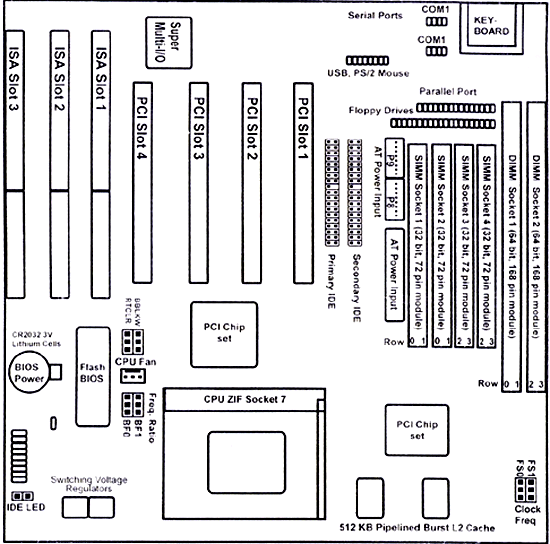
| In motherboard there are various PCI(Peripheral components Inteface) and ISA(Industrial Standard Architecture ) expansion slots to insert the adaptors of more devices to motherboard (example: adaptors of Modem, VGA(Video Graphic Adaptor) card, Sound card etc.). |
| |
| This adaptor also called the daughter board. |
| |
| Daughter board is an extra attachment to PC to get more facility to execute very specialized task. |
| |
| For example, |
| |
| if you want to listen music, you need audio player. If you want to see movie, you need a video player. |
| |
| Similarly in PC, if you want to listen music or see movie you need daughter boards (sound card, vedio adaptor etc.), which create an extra facility on your PC to work as an audio or video player (CD player). |
| |
| Daughter Board has extra features capable of executing specialized task. |
| |
| In a normal Human life, memory is unlimited. But in computer memory is limited and it needs expansion depending upon the task. |
| |
| This problem is solved in motherboard through Memory module sockets to increase memory of computer; one can insert more memory chips and increases he memory. |
| |
| There are Floppy disk drive connectors and IDE device connectors to connect Hard Disk Drive, Floppy Disk Drive, Compact Disk Drive. Every motherboard can have 4 HDD & 2 FDD. |
| |
| There are telephony connectors, audio connectors. |
| |
| There are serial COM1, COM2 (COM stands for communication) and parallel port connectors. |
| |
| The each element of computer is designed to operate in perfect synchronization. |
| |
| To do this they need a timekeeper, called system clock. In motherboard, 3 V lithium battery to supply power backup to the system clock during system powered -off. |
| |
| Monitor. |
| |
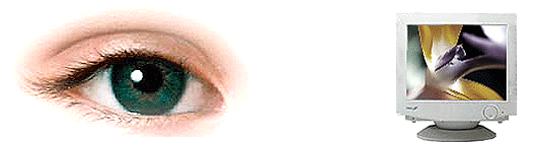
| Human being can see by eyes, but in computer system we need a crucial part called monitor to display the task executed by computer. |
| |
 |
| |
| |
|
| |
| |


