| Make a Start with Excel |
| |
| Starting a Work Book |
| |
| To start Excel 2007 from the Start Menu |
| |
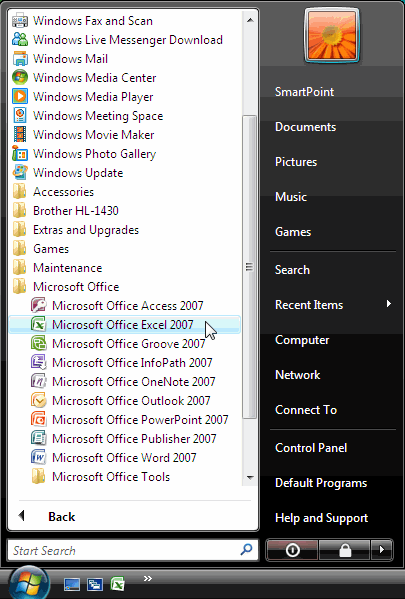
| . Click on the Start button, point to All Programs then Microsoft Office and click on Microsoft Office Excel 2007. |
| |
 |
| |
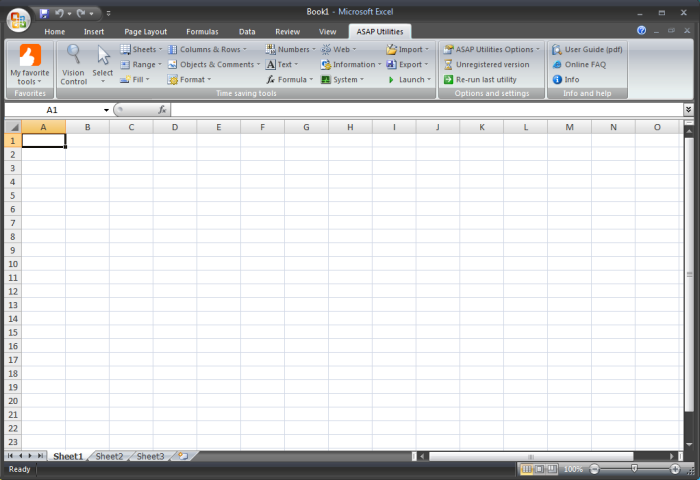
| . The first screen that you will see a new blank worksheet that contains grid of cells. This grid is the most important part of the Excel window. It's where you'll perform all your work, such as entering data, writing formulas, and reviewing the results. |
| |
 |
| |
| Microsoft Excel 2007 Workbook and Worksheet |
| |
. A worksheet is the grid of cells where you can type the data. The grid divides your worksheet into rows and columns.
. Columns are identified with letters (A, B, C . ), while rows are identified with numbers (1, 2, 3 . ).
. A cell is identified by column and row. For example, B8 is the address of a cell in column B (the second column), and row 8 (the eighth row).
. A worksheet in Excel 2007 consists of 16,384 columns and over 1 million rows. The worksheets in turn are grouped together into a workbook.
. By default each workbook in Excel 2007 contains 3 blank worksheets, which are identified by tabs displaying along the bottom of your screen. By default the first worksheet is called Sheet1, the next is Sheet2 and so on as shown here.

|
| |
 |
| |
| |
| |
|
| |
| |