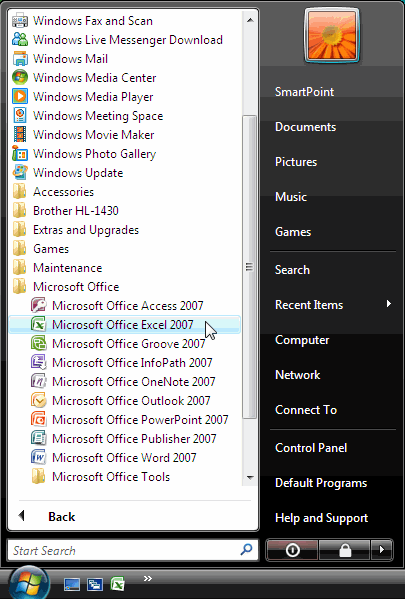
. All Programs
. Microsoft Office
. Microsoft Office Excel 2007.
 |
 |
 |
| Introduction to MS-Excel 2007 | |||
| How to Start Excel 2007 | |||
| Microsoft Office Excel 2007 provides several methods for starting and exiting the program. You can open Excel by using the Start menu or a desktop shortcut. When you want to exit Excel, you can do so by using the Office button, the Close button, or a keyboard shortcut. | |||
| Starting Excel 2007 from the Start menu | |||
| To start Excel 2007, | |||
| . choose Start . All Programs . Microsoft Office . Microsoft Office Excel 2007. |
|||
|
|||
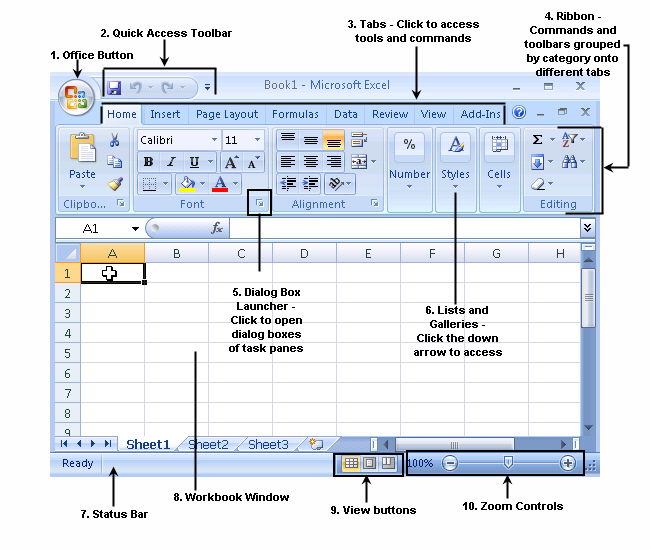
| A new, blank workbook appears, ready for you to enter data. | |||
|
|||
| Excel 2007 displays a new, blank workbook named Book1 when you start the program. | |||
| For Animated Presentaiton Click Here! | |||
|
|||