| Special Features in DOS |
| |
| Input/Output Redirection and Filter Commands |
| |
| So far, we might have learned how to use some
commands in their standard form, e.g. to display the content of a text
file, to view a directory listing or to view the tree structure of directories.
We can view the output directly on the screen. |
| |
| Using MS-DOS command in standard form, we type in our instruction at the command prompt, through the keyboard. It's a standard input. |
| |
| Then, MS-DOS will process your input and display
the result on the screen. It's a standard output. Up to this point, the job is simply done. |
| |
| Now, if we want to record a directory listing
for further reference or get a hard copy immediately, we need to instruct
MS-DOS not to display the result on the screen but to save it to a file
or print it out directly. It's called output redirection.
|
| |
| On the other hand, if we want to process a job
by using data on an existing file, we need to instruct MS-DOS to use
data from a given file. It's called input redirection. |
| |
| In some cases, moreover, we may need to process a job by
executing more than one command. By the way, the output from
the first command will not be displayed on the screen but to
be redirected into the input of the next command. It involves
both output and input redirection. The logical connection betwwen
these two commands is called piping. |
| |
| Piping is associated with filter commands: |
| 1. find, |
| 2. sort and |
| 3. more. |
| |
| |
| They are called filter commands because they work much like a filter
in a water system, which takes incoming water, changes it in some way, and
sends it along the system (a good explanation from Van Wolverton's Running MS-DOS). |
| |
| The application of these filter commands are listed as follow.
They can be used simply in an input redirection or through a
logical piping connection. |
| . Find searches input data for a text string. |
| . Sort arranges input data in order. |
| . More displays output one screen at a time. |
| |
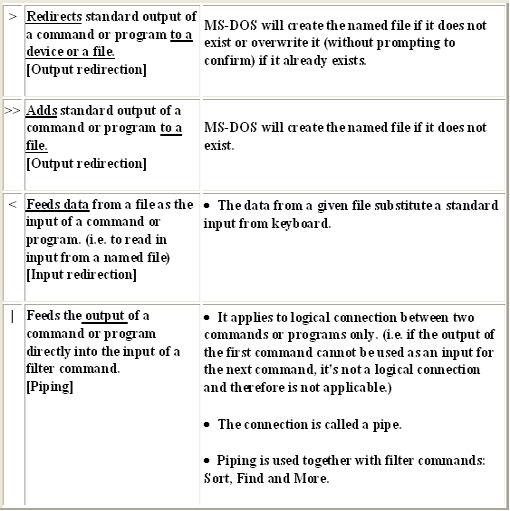
| The following special characters are needed in Input/Output redirection and Piping: |
| |
|
| |
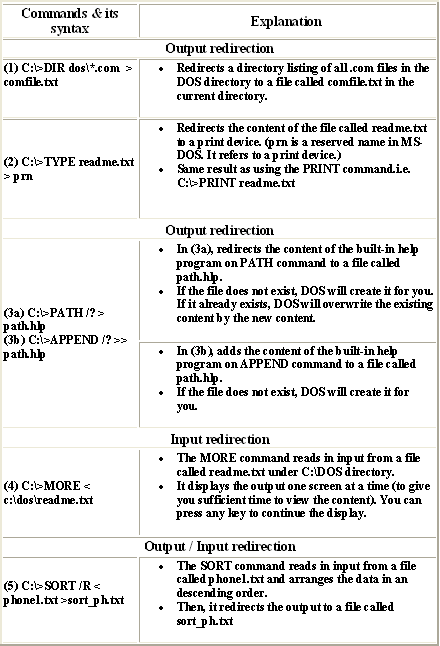
| Examples |
|
| |
| |
|
|
| |
| |