| Object & Class |
| |
| Object & Classes together |
| |
| Data Hiding is an important feature of object oriented programming. The mechanism of hiding data is to put them in a class and make it private. |
| |
| Thus this data is hidden and safe from any accidental manipulations, i.e none of the functions can accidentally change the member data. |
| |
| Object is an instance of a class, i.e. only when you define an object for a class, will the compiler allocate memory for the object. |
| |
| Class has two parts in it: private and public. As the name suggests, whatever is in private cannot be accessed by any function outside the class. |
| |
| Usually, data is made private while the functions are made public. For the Data hiding feature, data should be made private. |
| |
| Class is just a template or a form of data. Template means that it doesn’t physically occupy any memory space. But when an object is defined, memory is allocated. |
| |
| Template can be compared to the plan of a building. When the plan is drawn, we have not yet allocated the area on land for construction. We only know about how the building structure will be. |
| |
| But when construction is started, the area has been allocated. |
| |
| Similarly, the compiler allocates memory space only when an object of the class is defined. A class on its own without any objects does not occupy any space. |
| |
| Syntax of a class: |
| |
| (Keyword) class name_of_class |
| { |
| private : |
| private data; |
| public : |
| public function; |
| }; // End of class- make a note of the terminator. |
| |
| A program to demonstrate Classes |
| |
 |
| |
| Out put of the program |
| |
 |
| |
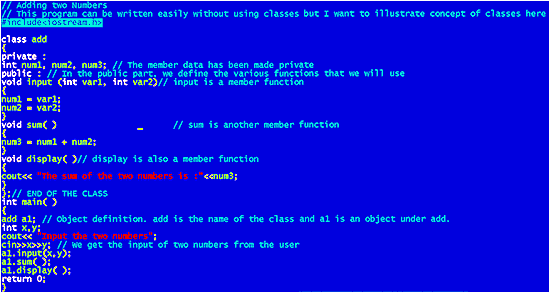
| First of all, the name of the class is add. Under this class we have the three member data: num1, num2, num3. Note that all three are made private. This means that any object that is created under the class add, will have these three member data already in it. |
| |
| Next comes the public part. In public we define any function that we want to make use of. The function definition is done in the usual way.
Remember: only functions belonging to the class can access the private members. |
| |
| We have made three functions for a simple operation of adding two numbers. If you go through the statements, you may feel that the same thing could have been put under one function itself. |
| |
| The answer yes. If you want, you do the adding of two numbers and displaying the result within one function itself. |
| |
| The three functions are called member functions, i.e. any object belonging to the class can make use of the member function. |
| |
| Just read on if you don’t understand. |
| |
| add a1 ; is the first statement in the main function. This statement creates an object named a1 belonging to the class add. Then we get the value for two integers x and y. The next statement is a1.input (x,y); |
| |
| a1 is the name of the object, input is a member function with two arguments (two integer arguments). If you remember we defined the input function in the public part of the class. |
| |
| Then there is the dot operator. The dot operator comes in between the object name and the member function. It is used to access or invoke the function. By invoke, We mean executing the function. |
| |
| When the compiler sees the line a1.input (x,y); it knows this is a function call. It goes to the input function that has been defined. The value of x and y is passed on to the integers var1 and var2. |
| |
| Then the input function is executed. The input function just assigns the value of var1 (i.e. actually the value of x that the user entered) to the member data num1. |
| |
| Similarly it assigns var2 to num2, which is also a member data. All the member functions can make use of the member datas. |
| |
| The next line in main is a1.add( ); |
| |
| This function has no arguments. So the the brackets are left empty. Again we are working with the same object a1. The add function is executed and finally the display function is also executed. |
| |
| You might be wondering what’s the use of the object a1? Why do we need it? |
| |
| Read on for answers: Just like a1 you can create another object called a2 under the same class add. This object will also have the same member datas and also the member functions. They can all be used in the same way as you used a1. |
| |
| If you are doing so, it would be advisable to make the following change: Put the statement to obtain the numbers from the user within the input function, rather than keeping it in the main function. |
| |
| The input function which comes under public part is changed as follows: |
| |
| void input ( ) // input is a member function |
| { |
| cout<< “Input the two numbers”; |
| cin>>num1>>num2; |
| } |
| |
| and in the main function you can write: |
| |
| int main( ) |
| { |
| add a1, a2; // Defining two objects a1 and a2 under the same class add |
| a1.input(x,y); // get the values for num1 and num2 for object a1 |
| a1.sum( ) |
| a1.display( ); // display sum of numbers entered for a1 |
| a2.input(x,y); // get the values for num1 and num2 for object a2 |
| a2.sum( ) |
| a2.display( ); // display the sum of two numbers entered for a2 |
| return 0; |
| } |
| |
| Hence in the result of the above program, you will get two separate answers. One is the result of adding num1 and num2 of a1 and the other is the result of adding num1 and num2 of a2. |
| |
| Beware while using Classes |
| |
| We wanted to write this section to illustrate the most important concept of classes. We think after reading this section you will be quite clear about classes. |
| |
| A few points to remember while using classes are: |
| |
| You cannot access private members of a class directly.
Private members can only be accessed through the member functions (which have to be public). |
| |
| An object can directly call only public functions. Private ones cannot be accessed directly. |
| |
| Example: |
| |
| class add |
| { |
| private: |
| int num1, num2, num3; // The member data has been made private |
| public: |
| |
| void input (int var1, int var2) |
| { |
| num1 = var1; |
| num2 = var2; |
| } |
| // ... you could have other member functions |
| }; |
| |
| int main ( ) |
| { |
| add a1; // Creating an object a1 |
| cout<<"Enter a value for num1"; |
| cin>>a1.num1; // *** Error cannot run this program *** |
| return 0; |
| } |
| The program will not run because of the code: a1.num1; |
| |
| a1 is an object of the class add. num1 is a private member of class add. Private members cannot be accessed directly by the object. Therefore, a1.num1 is an error. You can access num1 only through one of you public functions. |
| |
| Static Members |
| |
| We’ve already seen about the use of static. Now we shall see the use of static in classes. Before going into the topic We would like to restate that a class is just an empty area. |
| |
| No area is allocated when you create a class. So, only when you create an object of that class the compiler will allocate space to the object. Again, this means that: |
| |
| Private: |
| |
| int x; |
| |
| Does not allocate space for an integer x. When you create objects belonging to this class, required space is allocated for holding the integer. |
| |
| Each new object that you create belonging to this class will have its own version of the integer ‘x’. The keyword ‘static’ helps you to create a single copy for all objects belonging to the same class. |
| |
 |
| |
| Out put of the program |
| |
 |
| |
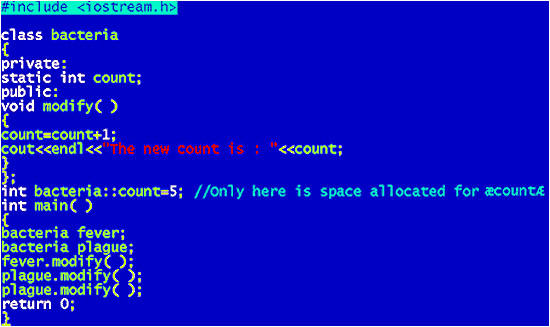
| As you can see, the integer ‘count’ is declared to be static. But again outside the class we say: |
| |
| int bacteria::count=5; |
| |
| This is done so that the compiler will allocate space for the integer ‘count’. If ‘count’ were not static, when would the compiler allocate space to it? It would allocate space when an object is created. |
| |
| But in the case of static variable members in a class, we will create it only once and so we have to ensure that the compiler creates that one instance of the variable. In this case we’ve initialized it to a starting value of 5. If you type: |
| |
| int bacteria::count; |
| |
| count would be initialized with 0. |
| |
| Since ‘count’ is static, each time you change the value of ‘count’, all the objects belonging to that class will make use of the new value. |
| |
| So far we’ve seen static member data but you can also make functions static in a class. Just precede the function by the keyword static. Static functions will be useful to operate on static member data |
| |
| Friend Function |
| |
| Remember We said that the private member datas of a class can be accessed only by the class' member functions. Well, there is one exception. |
| |
| We have what is called a friend function. As the name implies, a friend function will be friendly with a class even though it is not a member of that class. |
| |
| Perhaps we are confusing you a little. Don't worry, just check out the example below: |
| |
 |
| |
| Out put of the program |
| |
 |
| |
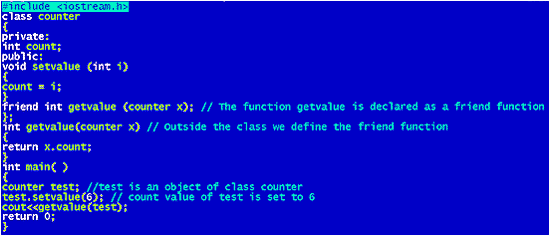
| we'll give you a little explanation so that you can understand the concept. First of all we've created a class named counter. |
| |
| It has one private data: count and one public function setvalue. It also has a friend function called getvalue. Then we've terminated the class. |
| |
| Next comes the definition of getvalue: |
| |
| int getvalue (counter x).......................Break up is as follows: int is the return data type. |
| |
| In this case we're returning an integer. The argument specifies an object. counter is the class we've created and so x will be an object of counter. We define the function as: return x.count |
| |
| What the compiler will do is to return the value of count for the object you've created. |
| |
| In the main ( ) part, we've created an object called test whose count value is set to 6. Then we've called the friend function using getvalue(test).........This means, the compiler goes to the friend function getvalue, and uses the object test as the argument. |
| |
| So the value returned will be the count value of test (in other words it is test.count) and the result will be 6. |
| |
| What is to be remembered is: Friend functions are not members of any class. They can access private data of the class to which they are a friend. Since they are not members of any class, you should not call them using the dot operator. |
| |
| More on Friend Functions |
| |
| You might be wondering what's the big point of Friend Functions. We could have made getvalue as a member function of the class instead of declaring it as a friend function. What's the use? |
| |
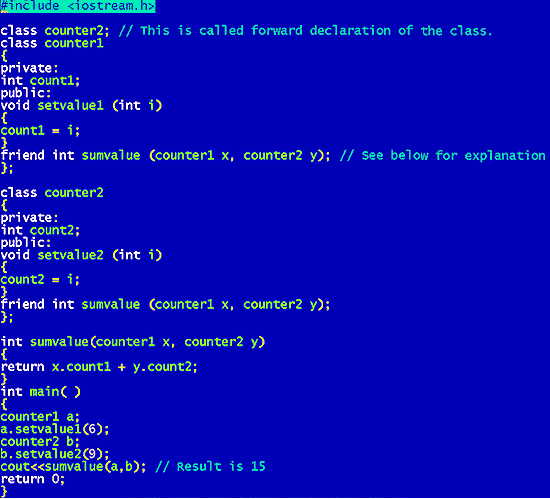
| There are many uses, but the one We will deal with here is : being friendly to 2 or more classes. The friend function does not belong to any class, so it can be used to access private datas of two or more classes. we'll show you with an example: |
| |
 |
| |
| Out put of the program |
| |
 |
| |
| Just one thing to explain: In the second line of the program we've written: class counter2; |
| |
| This is a forward declaration of the class counter2. This is done because when the compiler reads through the lines in counter1 class, it encounters the word counter2 in the friend function. |
| |
| Uptil this point it doesn't know what counter2 is because we will be defining the counter2 class later on. |
| |
| So we tell the compiler in advance that counter2 is a class by declaring it in the starting. If you don't declare it, you will get errors. Just check it out. |
| |
| One more note: You should declare the friend function in both the classes where you want it to be a friend. |
| |
| |
|
| |
| |


