| Control Structures & Operator |
| |
| Introduction of Operators |
| |
| Operator is not new for us, we have heard about operator before in our studies. C++ is also rich in case of operators. |
| |
| Once we know of the continuation of variables and constants, we can begin to operate with them. C++ integrates operators. |
| |
| Dissimilar other languages whose operators are mostly keywords, operators in C++ are habitually made of signs that are not part of the alphabet but are obtainable in all keyboards. |
| |
| Operators are tokens that trigger some computation when applied to variables and other objects in an expression. |
| |
| List of operators: |
| |
| Assignment: = |
| |
| Increment and decrement: ++ (pre or post fix) and -- (pre or post fix) |
| |
| Arithmetic: +, -, *, / and % (integer remainder) |
| |
| Relational: == (equality), != (inequality), <, >, <= and >= |
| |
| Boolean: && (and), || (or) and ! (not) |
| |
| Bitwise: & (and), | (or), ^ (xor), ~ (not), << (shift left) and >> (shift right) |
| |
| Compound assignation operators: +=, -=, *=, /=, %=, >>=, <<=, &=, ^=, |= |
| |
| and some other important we also discuss. |
| |
| Assignation: |
| |
| The assignation operator serves to assign a value to a variable. |
| |
| a = 5; |
| |
| assigns the integer value 5 to variable a. The part at the left of the = operator is known as lvalue (left value) and the right one as rvalue (right value). |
| |
| lvalue must always be a variable whereas the right side can be either a constant, a variable, the result of an operation or any combination of them. |
| |
| It is necessary to emphasize that the assignation operation always takes place from right to left and never at the inverse. |
| |
| a = b; |
| |
| Increament and Decrement: |
| |
| Another example of saving language when writing code are the increase operator (++) and the decrease operator (--). |
| |
| They increase or reduce by 1 the value stored in a variable. They are equivalent to +=1 and to -=1, respectively. Thus: |
| |
| a++; |
| a+=1; |
| a=a+1 |
| |
| are all equivalent in its functionality: the three increase by 1 the value of a. |
| |
| The Increment and decrement operators are further categorized into pre increment or decrement operators and post increment or decrement operators. |
| |
| Notice the difference: |
| |
| Example 1 |
| Example 2 |
| |
| B=3; |
| A=++B; |
| // A is 4, B is
4 |
| |
| B=3; |
| A=B++; |
| // A is 3, B is 4 |
| |
| In Example 1, B is increased before its value is copied to A. While in Example 2, the value of B is copied to A and B is later increased. |
| |
| Arithmetic operators: |
| |
| The five arithmetical operations supported by the language are: |
| |
| + addition |
| - subtraction |
| * multiplication |
| / division |
| % module |
| |
| Operations of addition, subtraction, multiplication and division should not suppose an understanding challenge for you since they literally correspond with their respective mathematical operators. |
| |
| The only one that may not be known by you is the module, specified with the percentage sign (%). Module is the operation that gives the remainder of a division of two integer values. |
| |
| For example: if we write a = 11 % 3;, the variable a will contain 2 as the result since 2 is the remainder from dividing 11 between 3. |
| |
| Relational operators ( ==, !=, >, <, >=, <= ) |
| |
| In order to evaluate a comparison between two expressions we can use the Relational operators. As specified by the ANSI-C++ standard, the result of a relational operation is a bool value that can only be true or false, according to the result of the comparison. |
| |
| We may want to compare two expressions, for example, to know if they are equal or if one is greater than the other. |
| |
| Here is a list of the relational operators that can be performed in C++: |
| |
| == Equal |
| != Different |
| > Greater than |
| < Less than |
| >= Greater or equal than |
| <= Less or equal than |
| |
| Here you have some examples: |
| |
| (7 == 5) would return false. |
| (5 > 4) would return true. |
| (3 != 2) would return true. |
| (6 >= 6) would return true. |
| (5 < 5) would return false. |
| |
| Logic operators |
| |
| Operator ! is equivalent to Boolean operation NOT, it has only one operand, located at its right, and the only thing that it does is to invert the value of it, producing false if its operand is true and true if its operand is false. |
| |
| It is like saying that it returns the opposite result of evaluating its operand. |
| |
| For example: |
| |
| !(5 == 5) returns false because the expression at its right (5 == 5) would be true. |
| |
| !(6 <= 4) returns true because (6 <= 4) would be false. |
| |
| !true returns false. |
| !false returns true. |
| |
| Logic operators && and || are used when evaluating two expressions to obtain a single result. |
| |
| They correspond with Boolean logic operations AND and OR respectively. The result of them depends on the relation between its two operands: |
| |
| First Operand a
Second Operand b |
| |
| result a && b |
| result a || b |
| |
| true |
| true |
| true |
| true |
| treue |
| false |
| false |
| true |
| false |
| true |
| false |
| true |
| false |
| false |
| false |
| false |
| |
| For example: |
| |
| ( (5 == 5) && (3 > 6) ) returns false ( true && false ). |
| |
| ( (5 == 5) || (3 > 6)) returns true ( true || false ). |
| |
| Bitwise Operators |
| |
| Bitwise operators modify variables considering the bits that represent the values that they store, that means, their binary representation. |
| |
| op |
| asm |
| Description |
| & |
| And |
| Logical And |
| I |
| OR |
| Logical OR |
| ^ |
| XOR |
| LOgical exclusive OR |
| ~ |
| NOT |
| Complement to one (bit inversion) |
| << |
| SHL |
| Shift Left |
| >> |
| SHR |
| Shift Right |
| |
| Compound assignation operators |
| |
| A feature of assignation in C++ that contributes to its fame of sparing language when writing are the compound assignation operators (+=, -=, *= and /= among others), which allow to modify the value of a variable with one of the basic operators: |
| |
| value += increase; is equivalent to value = value + increase; |
| |
| a -= 5; is equivalent to a = a - 5; |
| |
| a /= b; is equivalent to a = a / b; |
| |
| price *= units + 1; is equivalent to price = price * (units + 1); |
| |
| Some other operator |
| |
| Conditional operator (?). |
| |
| The conditional operator evaluates an expression and returns a different value according to the evaluated expression, depending on whether it is true or false.
Its format is: |
| |
| exp1?exp2;exp3 |
| |
| if condition is true the expression will return result1, if not it will return result2. |
| |
| 7==5 ? 4 : 3 returns 3 since 7 is not equal to 5. |
| |
| 7==5+2 ? 4 : 3 returns 4 since 7 is equal to 5+2. |
| |
| 5>3 ? a : b returns a, since 5 is greater than 3. |
| |
| a>b ? a : b returns the greater one, a or b. |
| |
| Explicit type casting operators |
| |
| Type casting operators allows you to convert a datum of a given type to another. |
| |
| Type casting operators allows you to convert a datum of a given type to another. There are several ways to do this in C++, the most popular one, compatible with the C language is to precede the expression to be converted by the new type enclosed between parenthesis (): |
| |
| int i; |
| |
| float f = 3.14; |
| |
| i = (int) f; |
| |
| The previous code converts the float number 3.14 to an integer value (3). Here, the type casting operator was (int). |
| |
| Another way to do the same thing in C++ is using the constructor form: preceding the expression to be converted by the type and enclosing the expression between parenthesis: |
| |
|
| i = int ( f ); |
| |
| Both ways of type casting are valid in C++. And additionally ANSI-C++ added new type casting operators more specific for object oriented programming. |
| |
| sizeof() |
| |
| This operator accepts one parameter, that can be either a variable type or a variable itself and returns the size in bytes of that type or object: |
| |
| a = sizeof (char); |
| |
| This will return 1 to a because char is a one byte long type. |
| |
| The value returned by sizeof is a constant, so it is always determined before program execution. |
| |
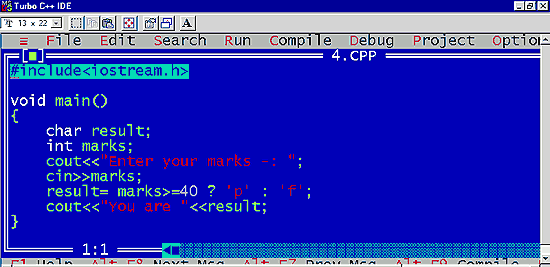
| Program to show the use of conditional operator: |
| |
 |
| |
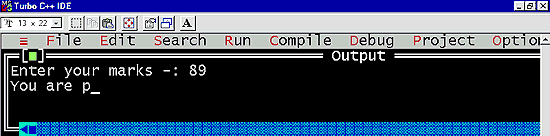
| Out put of the program |
| |
 |
| |
| If statement1 evaluate true then the value of the whole statement is the value of statement2 otherwise the value of the whole statement is the value of statement3. |
| |
| Scope Resolution Operator: :: |
| |
| You can tell the compiler to use the global identifier rather than the local identifier by prefixing the identifier with ::, the scope resolution operator. |
| |
| :: identifier |
| |
| class-name :: identifier |
| |
| namespace :: identifier |
| |
| The identifier can be a variable or a function. |
| |
| If you have nested local scopes, the scope resolution operator does not provide access to identifiers in the next outermost scope. It provides access to only the global identifiers. |
| |
| Example: |
| |
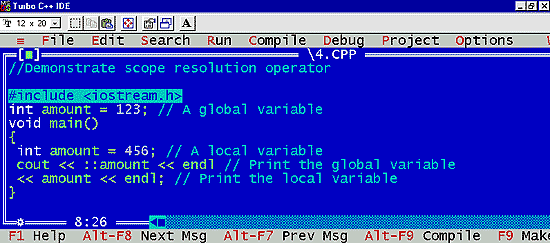
| // Demonstrate scope resolution operator |
| |
 |
| |
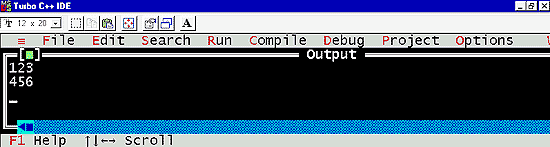
| Out put of the program |
| |
 |
| |
| The example above has two variables named amount. The first is global and contains the value 123. The second is local to the main function. The scope resolution operator tells the compiler to use the global amount instead of the local one. |
| |
| Note: The Function of I/O Library - iostream.h |
| |
| At lowest levels, files are implemented as stream of bytes. A stream is simply a sequence of bytes. Input and output operation are supported by the istream (input stream) and ostream (output stream) classes. iostream.h is a header file which defines all the input and output operators. |
| |
| Output operator |
| |
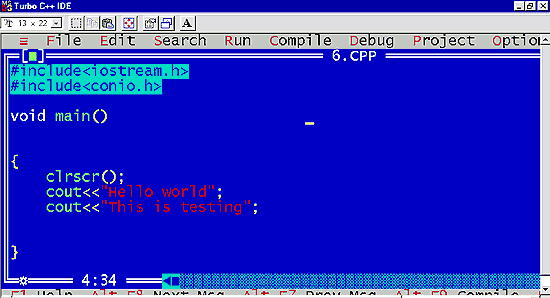
| cout << "C++ is a object oriented language "; |
| |
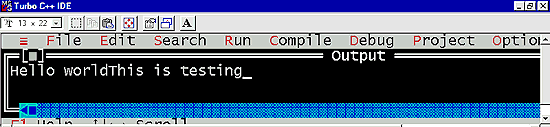
| The operator << is called the insertion or put to operator. It insert or sends the contents of the variable on its right to the object. on its left. |
| |
| In other words this operator is used to display the output on the screen.
Program to show use of output operator: |
| |
 |
| |
| Out put of the program |
| |
 |
| |
| Input operator |
| |
| cin>>"Ebiz is world's largest MLM company"; |
| is an input statement or causes the program to wait for the user to type in a number. |
| |
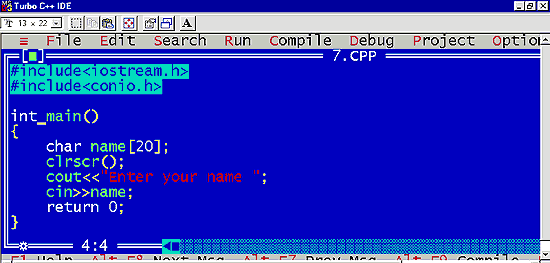
| The operator >> is known as a extraction to get from operator. It extracts or take the value from the key word and assign it to the variable on its right. |
| |
| In other words this operator is used to read a value from standard input.
Program to show use of input operator: |
| |
 |
| |
| Output of the program |
| |
 |
| |
| For storing the values a variable is used. A variable refers to a storage area whose contents can vary during processing. |
| |
| Priority of operators |
| |
| Priority of operators When making complex expressions with several operands, we may have some doubts about which operand is evaluated first and which later. |
| |
| For example: |
| |
| in this expression: |
| |
| a = 5 + 7 % 2 |
| |
| we may doubt if it really means: |
| |
| a = 5 + (7 % 2) with result 6, or |
| a = (5 + 7) % 2 with result 0 |
| |
| The correct answer is the first of the two expressions, with a result of 6. |
| |
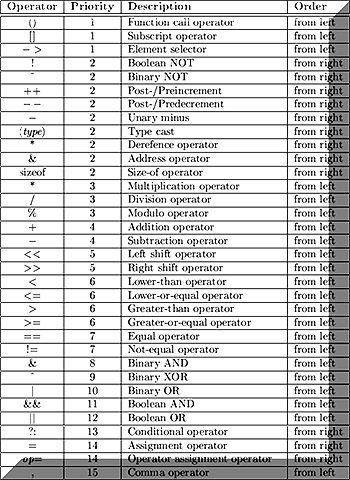
| There is an established order with the priority of each operator, and not only the arithmetic ones (those whose preference we may already know from mathematics) but for all the operators which can appear in C++. From greatest to lowest priority |
| |
| The priority order is as follows: |
| |
| Operators Precedence and Associatively |
| |
 |
| |
| Associativity defines -in the case that there are several operators of the same priority level- which one must be evaluated first, the rightmost one or the leftmost one. |
| |
| All these precedence levels for operators can be manipulated or become more legible using parenthesis signs ( and ), as in this example: |
| |
| a = 5 + 7 % 2; |
| |
| might be written as: |
| |
| a = 5 + (7 % 2); or |
| a = (5 + 7) % 2; |
| |
| according to the operation that we wanted to perform. |
| |
| So if you want to write a complicated expression and you are not sure of the precedence levels, always include parenthesis. It will probably also be more legible code. |
| |
| Memory Management Operators |
| |
| C uses malloc() and calloc() functions to allocate memory dynamically at run time. Similarly, it uses the function free() to free dynamically allocated memory. |
| |
| Although C++ supports these functions , it also defines two unary operators new and delete that perform the task of allocating and freeing the memory in a better and easier way. |
| |
| An object can be created by using new and destroyed by using delete as and when required. |
| |
| The new operator can be used to create object of any type. It takes the following general term: |
| |
| Syntax |
| |
| pointer-variable = new data-type; |
| |
| Here, pointer-variable is a pointer of data-type. The new operator allocates sufficient memory to hold a data object of type data-type and returns the address of the object. |
| |
| Example |
| |
| p = new int; |
| q = new float; |
| |
| If we want to free a dynamically allocated array , we must use the following form of delete: |
| |
| Syntax |
| |
| delete [size] pointer-variable |
| |
| The size specifies the number of elements in the array to be freed. The problem with this form is that the programmer should r remember the size of the array. |
| |
| Example |
| |
| delete [ ] p; |
| |
| will delete the entire array pointed to by p. |
| |
| |
|
| |
| |


