| Java array require that all elements be of the same data type. |
| For example, |
| We may create an array of char values, or an array of float values, or an array of boolean values, etc... |
| Java array are objects and must be declared like one. |
| The general syntax is as follows: |
| data-type[] identifier = new data-type[n]; or data-type identifier[] = new data-type[n]; |
| Where identifier is the array (object) reference and n is an integer expression that specifies how many elements are in the array. |
| For example, |
| int[] myArray = new int[5]; |
| Alternatively, a programmer may split the definition of the array reference and the instantiation of the array into two statements as follows: |
| int[] myArray; myArray = new int[5]; |
| Using either technique, it is important to understand what is created. |
| The following diagram may help: |
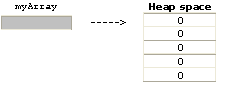 |
| The array reference (myArray) can be thought of as pointing to the array whose elements reside on the memory heap. |
| Notes: |
| 1. At the time an array reference is declared, it initially contains null (it doesn't point to anything). It doesn't receive a value until an array is assigned to it. |
| 2. An array reference can only be assigned an array of the correct type. In the above example, myArray is declared to be a reference to an int array, so only an array of int values can ever be assigned to it. To attempt otherwise will result in a compile error. |
| 3. An array reference may be reused to point to a different array (of the appropriate type). Like all objects, however, an array that can no longer be r eferenced will be garbage collected. |
| 4. When instantiated, all array elements are automatically initialized to binary zeros. This means all elements of numeric arrays will be zero, all elements of boolean arrays will be false, and all elements of char arrays will be the null character. |
| Java array can be constructed from a value list. |
| This is an alternative construction technique as shown by |
| char[] chars = {'a', 'b', 'c'}; |
| This creates a three element array of characters. The first element is initialized to 'a', the second is initialized to 'b', and the third is initialized to 'c'. |
| Notes: |
| 1. The number of elements in the array is determined by the number of values in the list and the new keyword isn't coded. |
| 2. When a value list is used, it can only be coded in the statement that declares the array reference. |
| In other words, the following will not compile: |
| char[] chars; chars = {'a', 'b', 'c'}; |
| Java array permit an element to be accessed via its unique index. |
| For example, |
| int[] numbers = {12, 15, 3, 8}; |
| The following expression will reference the third element (an int with a value of 3) |
| numbers[2] |
| Notes: |
| 1. An index must be int or able to be widened to int to avoid a compile error. It may not be boolean, long, float, or double. |
| 2. If an index is negative of exceeds the maximum valid index for the array, a runtime error occurs. The JVM will throw an ArrayIndexOutOfBoundsException. Catching and processing such exceptions is a topic in advanced Java. |
| Java array have a publicly available length field. This is an int constant representing the number of elements within the array. It is extremely useful when coding a loop to process all the elements within an array. |
| For example, |
| The following small program creates an array, loads it with some random numbers, and displays the array's contents: |
| public class AppArr { public static void main(String[] args) { double[] values = new double[10]; for (int i = 0; i < values.length; i++) { values[i] = Math.random(); } for (int i = 0; i < values.length; i++) { System.out.println(values[i]); } } } |
| Notes: |
| 1. In an array object, length is a field and NOT a method. A common mistake is to code length() as you would with a String or StringBuffer object and get a compile error. |
| 2. Because the for loops are limited by the length of the array, the code is very flexible. Changing the number of elements in the array declaration is all that is needed to work with a different sized array. |
 |
 |
 |