| Multithreading |
| |
| Thread Attributes |
| |
| Java threads are implemented by the Thread class, which
is part of the java.lang package. The Thread class implements
a system independent definition of Java threads. But under the
hood, the actual implementation of concurrent operation is
provided by a system-specific implementation. |
| |
| The life of a thread |
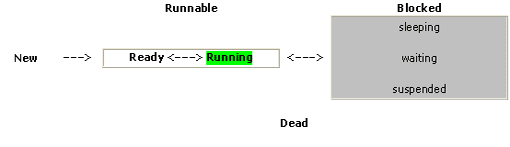
| In Java, all threads are objects that are constructed, pass
between several "states", and die in keeping with the following diagram: |
| |
|
| |
| |
| 1. When initially constructed, the thread is New |
| |
| 2. When all resources the thread requires are available, it
enters the Ready state. The thread is ready to use the CPU. |
| |
| 1. When selected by the JVM for processing, the thread enters the
Running state. This is the state that all threads aspire to but
only one is ever running at an instant in time. |
| |
| 2. When the thread requests to sleep for an interval of
time, must wait for a resource (such as completion of I/O), or
is suspended by the JVM, it becomes Blocked. It gives up the
CPU and will return to the Ready state when the block is removed. |
| |
| 3. When the thread completes its processing or is killed by
the JVM, it enters the Dead state. The thread object will still
exist, but will no longer be allowed to use the CPU. |
| |
| |
| Thread Body |
| All of the action takes place in the thread's body--the
thread's run() method. We can provide the body to a Thread in one of two ways: |
| a. by subclassing the Thread class
and overriding its run() method, |
|
| b. by creating a Thread with a Runnable object as its target. |
| |
| |
| Creating the Thread |
| The application in which an applet is running calls the applet's
start() method when the user visits the applet's page. |
| The Clock applet creates a Thread, clockThread, in its
start() method and starts the thread. |
| |
public void start()
{
if (clockThread == null)
{
clockThread = new Thread(this, "Clock");
clockThread.start();
}
} |
| |
| First, the start() method checks to see if clockThread is null.
If clockThread is null, then the applet has just been loaded or has been
previously stopped and a new thread must be created.
|
| |
| Otherwise, the applet is already running. The applet creates
a new thread with this invocation: |
| clockThread = new Thread(this, "Clock"); |
| |
| Here--the Clock applet--is the first argument to the thread
constructor. The first argument to this Thread constructor must
implement the Runnable interface and becomes the thread's target.
When constructed in this way, the clock thread gets its run() method
from its target Runnable object--in this case, the Clock applet. |
| |
| The second argument is just a name for the thread. |
| |
| After a thread has been created and initialized, the
runtime system calls its run() method. The code in the run() method
implements the behavior for which the thread was created. |
| |
| |
| Stopping the Thread |
| When we leave the page that displays the Clock applet, the
application in which the applet is running calls the applet's stop() method. |
| The Clock's stop() method sets the clockThread to null. |
| This tells the main loop in the run() method to terminate eventually
resulting in the thread stopping and being garbage collected. |
public void stop()
{
clockThread = null;
} |
| |
| we can use clockThread.stop() instead, which
would immediately stop the clock thread. |
| However, the Thread class's stop() method has a sudden effect,
which means that the run() method might be in the middle of
some critical operation when the thread is stopped. |
| For more complex run() methods, using Thread's stop() method
might leave the program in an inconsistent or awkward state.
For this reason, it's best to avoid using the Thread class's
stop() method when possible. |
| |
| If we revisit the page, the start() method is called again, and
the clock starts up again with a new thread. |
| |
| |
| The Run Method |
| And finally the Clock's run() method implements the heart of the Clock applet and looks like this: |
| |
public void run()
{
// loop terminates when clockThread is set to null in stop()
while (Thread.currentThread() == clockThread)
{
repaint();
try
{
Thread.sleep(1000);
}
catch (InterruptedException e)
{
}
}
} |
| |
| |
|
|
| |
| |