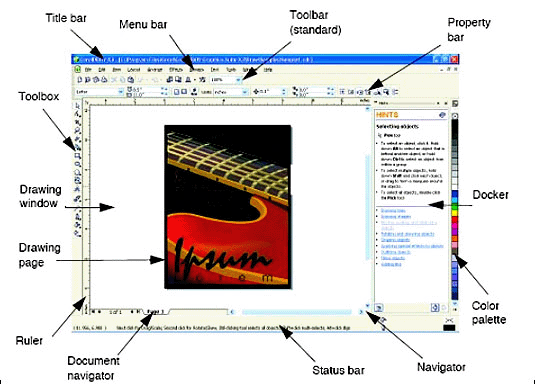
| Title Bar | Displays the program name with the name of the opened file. |
| Menu Bar | The area containing drop-down menus with commands grouped by category |
| Property Bar | A detachable bar with commands that relate to the active tool or object. For example when the text tool is active, the text property bar displays commands that let you create and edit text. |
| Tool Bar | A detachable bar that contains shortcuts to menu and other commands. The standard toolbar contains shortcuts to basic commands, such as opening saving and printing. |
| Rulers | Horizontal and vertical borders that are used to determine the size and position of objects in the drawing. |
| Toolbox | A detachable bar with tools for creating, filling, and modifying objects in the drawing. |
| Drawing Window | The area outside the drawing page bordered by the scroll bars and application controls. |
| Drawing Page | The rectangular area inside the drawing window. It is the printable area of your work area. |
| Color Palette | A detachable bar that contains color swatches. |
| Docker | A window containing commands and setting relevant to a specific tool or task. |
| Status bar | An area at the bottom left of the application window that contains controls for the moving between pages and adding pages. |
| Document Navigator | The area at the bottom left of the application window that contains control for moving between pages and adding pages. |
| Navigator | A button at the lower-right corner of the drawing window that opens a smaller display to help you move around a drawing. |
 |
 |
 |