| Computer Fundamental |
| |
| Basic Computer Operation |
| |
| Starting |
| Like all electronic devices, the
computer has an ON-OFF switch to bring power into it.
You will find either a pushbutton switch located on the
front of the CPU housing, or a toggle switch located on
the back of the CPU housing. |
| |
| Chances are that the monitor and
the computer are not powered by the same switch. It the
monitor has an ON-OFF switch, it should be on before the
CPU is brought to life. The same is true for any peripherals
that the computer will be using. It is best to have them turned
on so that the computer can find them as it runs through
its start up instructions. |
| |
The operating system of a modern PC is
very complex and may take over a minute or two to completely
prepare itself for use. Once the computer has completed the
startup procedure, it is ready to take orders from its master....you!
Most of what you will do with the computer after it starts can be
accessed using the "Start" button  at the lower left corner of the screen. at the lower left corner of the screen. |
| |
| |
| Stopping |
| When you are ready to stop using the
computer, you must take it through a shutdown procedure.
Fortunately, this only involves selecting the "Start" button
and choosing the lowest selection on the menu. . ."Shutdown".
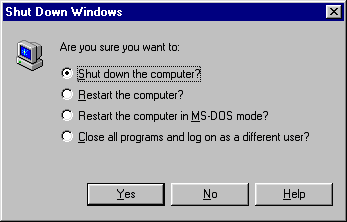
The following dialogue screen will appear: |
| |
|
| |
| Wait for the computer to complete its
internal shutdown instructions before switching off the power. |
| |
| |
|
|
| |
| |