| Command line parameter of C |
| |
| Command line parameter |
| |
| You may have been wondering about the empty parentheses in the first line of the main function, i.e. main(). |
| |
| The parentheses may contain special arguments that allow parameters to be passed to main from the operating system. |
| |
| Most versions of C permit two such arguments, which are traditionally called argc and argv, respectively. |
| |
| The first of these, argc, must be an integer variable, while the second, argv, is an array of pointers of characters; i.e., an array of strings. |
| |
| Each string in this array will represent a parameter that is passed to main. The value of argc will indicate the number of parameters passed. |
| |
| Example: The following outline indicates how the arguments argc and argv are defined within main. |
| |
| Vod main(int argc, char *argv[]) |
| { |
| ..... |
| } |
| |
| The first line can be written without the keyword void, i.e., |
| |
| main(int argc, char *argv[]) |
| |
| A program is normally executed by specifying the name of the program within a menu-driven environment. |
| |
| Some compilers also allow a program to be executed by specifying the name of the program (actually, the name of the file containing the compiled object program) at the operating system level. |
| |
| The program name is then interpreted as an operating system command. Hence, the line in which its appears is generally referred to as a command line. |
| |
| In order to pass one or more parameters to the program when it is executed from the operating system, the parameters must follow the program name on the command line. |
| |
| E.g.: Program-name parameter 1 parameter 2 . . . parameter n |
| |
| The individual items must be separated from one another either by blank spaces or by tabs. |
| |
| Some operating systems permits blank spaces to be included within a parameter provided the entire parameter is enclosed in quotation marks. |
| |
| The program name will be stored as the first item in argv, followed by each of the parameters. Hence, if the program name is followed by n parameters. |
| |
| There will be (n+1) entries in argv, ranging from argv [0] to argv [n]. Moreover, argc will automatically be assigned the value (n+1). |
| |
| Note that the value for argc is not supplied explicitly from the command line. |
| |
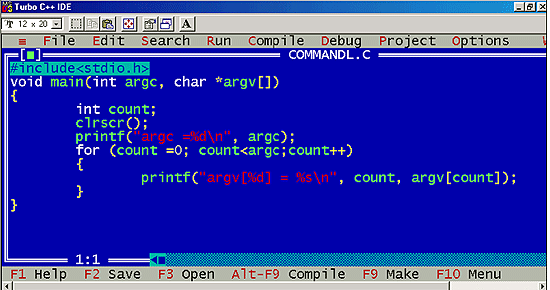
| An example program which will be executed from a command line: |
| |
 |
| |
| Out put of the program |
| |
 |
| |
| This program allows an unspecified number of parameters to be entered from the command line. |
| |
| When the program is executed, the Count value for argc and the elements of argv will be displayed as separate lines of output. |
| |
| Sample red white blue |
| |
| then the program will be executed, resulting in the following output. |
| |
| argc =4 |
| argv [0]=sample.exe |
| argv [1]=red |
| argv [2]=white |
| argv [3]=blue |
| |
| The output tells us that four separate items have been entered form the command line. |
| |
| The first is the program name, sample. exe, followed by the three parameters., red. White and blue. |
| |
| Each item is an element in the array argv. (Name that sample.exe is the name of the object file resulting from the compilation of the source code sample. C.) |
| |
| Similarly, if the command line is |
| |
| Sample red "white blue" |
| |
| The resulting output will be |
| |
| argc=3 |
| argv [0]=sample.exe |
| argv [1]=red |
| argv [2]=white blue |
| |
| In, this case the string "white blue" will be interpreted as a single parameter, because of the quotation marks. |
| |
| Once the parameters have been entered, they can be utilized within the program in any desired manner. |
| |
| One particularly common application is to specify the names of data files as command line parameter. |
| |
| |
| |
| |
| |


