| Caching in ASP.Net |
| |
| Type of Caching |
| |
| In all Caching types, objects or information are placed in the cache memory (an area of memory which is managed by server). ASP.NET provides caching using two basic caching mechanisms. The first is application caching which allows you to cache data you produce. The second one is page output caching, which saves the output of page processing and reuses the output instead of re-creating the page when a user requests the page again. |
| |
| There are many different types of Caching in ASP.NET. One of the types is automatic and manual. In automatic, no interference is needed by developer, while manual needs explicit planning and coding. |
| |
1. Class Caching
2. Configuration Caching
3. Output Caching
4. Partial Caching
5. Data Caching |
| |
| Class Caching |
| |
| In this type of caching no interference is needed by developer as it is done automatically. When a web application or web service is compiled to a page class in an assembly for the first time or service is run, it causes a delay. But the compiled assembly is then cached automatically on the server and is calls the referenced subsequent web page or service directly. This process is automatically managed by CLR for the first time or any other time when source code changes and CLR needs to recompile the assembly. |
| |
| Configuration Caching |
| |
| In ASP.Net 2.0 some new features are added to help with cache configuration. Cache profiles enable you to configure cache profiles in the configuration system, and then use those profiles on pages. This enables changes to caching for sets of pages to be made on a global basis. |
| |
| Output Caching |
| |
| Output caching is the caching of pages or part of pages contents in the serverâs memory that are sent to client machine. To enable Output caching, you can use either the OutputCache directive or the HttpCachePolicy class. Output caching improves the performance of an ASP.NET application. By using the output cache, subsequent requests for that page are served from the output page without executing the code that created it. |
| |
| Directive of OutputCache |
| |
| The directive for output cache is the @OutputCache directive. The attributes of OutputCache directive are given below: |
| |
Duration: Specifies how long the page will be cached, measured in seconds.
Location: Specifies the device you will cache on. Can be: browser, server, or any. (The default is any)
CacheProfile: The name of the cache settings in the web.config file, to associate with the page (this is optional).
NoStore: A Boolean value that indicate whether or not to allow or prevent secondary storage of sensitive information.
Shared: A Boolean value that indicate whether or not the page output can be shared with multiple pages.
SqlDependency: A String value that identifies a string of database name and a table name associated with the output cache of this page or control.
VaryByParam: This parameter allows to cache different versions of the page depending on which parameters are submitted to the server when the page is requested. These parameters are a semi colon delimited list of strings that gives you the ability to cache multiple responses from a single web form.
VaryByControl: This parameter is used to cache the user controls. The parameters are a semi colon delimited list of strings that gives you the ability to cache portions of web forms.
VaryByCustom: This parameter allows the cache to be varied by browser if the value of the parameters is set to browser.
VaryByHeader: This parameter allows the cache to be varied by HTTP header. The value of the parameter consists of a semicolon-separated list of HTTP headers. The VaryByHeader is can not be used in Output Cache directives in user controls.
DiskCachable:The DiskCachable is used to keep the cache data on the disk when the cache memory is not available. It uses boolean value, false to disable disk caching and true to enable caching which is default. |
| |
| Sample Code |
| |
<% @OutputCache %> directive to the top of your page like so:
<%@ Page ... %>
To Cache the page for 20 seconds with the list of parameter specified in VaryByParam.
<%@ OutputCache Duration="20" VaryByParam="param_list"%>
<%@ OutputCache Duration="20" VaryByParam="*" or ânone? %> |
| |
| The above same code is used to Cache the page for 20 seconds and you can use â*? and ânone? as parameter in VaryByParam. The ânone? specifies to save only single version of the page in the cache and return that version only. The save a separate version of the page in cache of each unique combination of query string value or form variable. |
| |
| Sample code: |
| |
| The default.aspx page |
| |
<%@ Page Language="C#" AutoEventWireup="true"
CodeBehind="Default.aspx.cs" Inherits="MYWebApplication._Default" %>
<%@ Register Src="WebUserControl1.ascx" TagName="WebUserControl1" TagPrefix="uc1"%>
<!DOCTYPE html PUBLIC "-//W3C//DTD XHTML 1.0 Transitional//EN"
"http://www.w3.org/TR/xhtml1/DTD/xhtml1-transitional.dtd">
<html xmlns="http://www.w3.org/1999/xhtml" >
<head runat="server">
<title>This is My Site&/title>
<link href="" rel="stylesheet" type="text/css" />
</head>
<body style="background-color: #ffefff" >
<form id="form1" runat="server">
<div >
<asp:Label ID="Label1" runat="server" EnableTheming ="false" Font-Bold="True"
Font-Size="Large" Height="24px"
Style="left: 182px; position: relative; top: -1px" Text="Wecome To eBIZ" Width="152px"></asp:Label>
<asp:Label ID="Label2" runat="server" Font-Bold="False" Font-Size="Medium" Height="24px"
Style="left: -478px; position: relative; top: 48px" Text="First Name" Width="70px"></asp:Label>
</form>
</body>
</html> |
| |
| The default.aspx.cs page |
| |
using System;
using System.Data;
using System.Configuration;
using System.Collections;
using System.Web;
using System.Web.Security;
using System.Web.UI;
using System.Web.UI.WebControls;
using System.Web.UI.WebControls.WebParts;
using System.Web.UI.HtmlControls;
namespace MYWebApplication
{
public partial class _Default : System.Web.UI.Page
{
protected void Page_Load(object sender, EventArgs e)
{
Label1.Text ="Page Was Loaded :"+System.DateTime.Now .ToLongTimeString();
}
}
} |
| |
| Partial-Page Caching |
| |
| In certain cases, it is not practically possible or not needed to cache an entire page and some part of the page must be created or modified for each request. In such case, it is often useful to identify objects or data that are costly to construct then caching should be used. Once these objects are recognized, they can be created once and then cached for some period of time, such type of caching is known as fragmented or partial caching. This fragmented or partial caching works by creating a page without output caching that uses a User Control that does use output caching. |
| |
| Partial caching is done using the @ OutputCache directive. The partial Caching is implemented by using the VaryByParam attribute in addition with a VaryByControl attribute. For example: |
| |
| If you use a user control with OutputCache directive for some duration in the normal aspx page then on refreshing the normal aspx page, the user control is still not refreshed in that specified duration while other parts get refreshed. |
| |
| Sample code of user control |
| |
The WebUserControl1.ascx.cs page
<%@ Control Language="C#" AutoEventWireup="true" CodeBehind="WebUserControl1.ascx.cs" Inherits="MYWebApplication.WebUserControl1" %>
<%@ OutputCache Duration="20" VaryByParam ="*" %>
<asp:Label ID="Label2" runat="server" Style="position: relative" Text="Time"></asp:Label>
The WebUserControl1.ascx.cs page
using System;
using System.Data;
using System.Configuration;
using System.Collections;
using System.Web;
using System.Web.Security;
using System.Web.UI;
using System.Web.UI.WebControls;
using System.Web.UI.WebControls.WebParts;
using System.Web.UI.HtmlControls;
namespace MYWebApplication
{
public partial class WebUserControl1 : System.Web.UI.UserControl
{
protected void Page_Load(object sender, EventArgs e)
{
Label2.Text = System.DateTime.Now.ToLongTimeString();
}
}
}
Sample code for Normal aspx(default.aspx)page
<%@ Page Language="C#" AutoEventWireup="true" CodeBehind="Default.aspx.cs" Inherits="MYWebApplication._Default" %>
<%@ Register Src="WebUserControl1.ascx" TagName="WebUserControl1" TagPrefix="uc1" %>
<!DOCTYPE html PUBLIC "-//W3C//DTD XHTML 1.0 Transitional//EN" "http://www.w3.org/TR/xhtml1/DTD/xhtml1-transitional.dtd">
<html xmlns="http://www.w3.org/1999/xhtml" >
<head runat="server">
<title>This is My Site</title>
<link href="" rel="stylesheet" type="text/css" />
</head>
<body style="background-color: #ffefff" >
<form id="form1" runat="server">
<div>
<asp:Label ID="Label1" runat="server" EnableTheming ="false" Font-Bold="True" Font-Size="Large" Height="24px"
Style="left: 182px; position: relative; top: -1px" Text="Wecome To eBIZ" Width="152px"></asp:Label>
<asp:Label ID="Label2" runat="server" Font-Bold="False" Font-Size="Medium" Height="24px"
Style="left: -478px; position: relative; top: 48px" Text="First Name" Width="70px"></asp:Label>
</form>
</body>
</html>
The default.aspx.cs page
using System;
using System.Data;
using System.Configuration;
using System.Collections;
using System.Web;
using System.Web.Security;
using System.Web.UI;
using System.Web.UI.WebControls;
using System.Web.UI.WebControls.WebParts;
using System.Web.UI.HtmlControls;
namespace MYWebApplication
{
public partial class _Default : System.Web.UI.Page
{
protected void Page_Load(object sender, EventArgs e)
{
Label1.Text ="Page Was Loaded :"+System.DateTime.Now .ToLongTimeString();
}
}
} |
| |
| Note that similar to output-cached pages, explicit use of VaryByParam is required even if it is not used. If the user control contained a drop-down select box control named Category, the user control's output would vary based on the selected value within that control. |
| |
| Data Caching |
| |
| The Data caching is the caching of data from the data source. ASP.NET cache object supports data caching. Data Caching is used to cache objects into the memory and these object are used later in the web application and in this way the performance and scalability can be improve. This enables you to use the cached object across all the pages of the application. The lifetime of such cached objects is that of the application itself. If the application is restarted then all the cached objects are destroyed. Data Caching is useful when you need to cache your own custom data into cache. |
| |
| The cache object facilitate you to store everything from simple name/value pairs to more complex objects like datasets and entire aspx pages. |
| |
| You can use the cache object as given below: |
| |
| Cache["dataset"] = mydataset; |
| |
| After an item is in cache, you can retrieve it later as shown below: |
| |
DataSet ds = new DataSet();
ds = (DataSet)Cache["dataset"]; |
| |
| Using cache object is an outstanding way to cache your pages. Above fragment shows simple use of the Cache object. |
| |
| The data might be refreshed at regular intervals or the data is valid for a certain amount of time. In that case, the cache items can be given an expiration policy that causes them to be removed from the cache when they have expired. |
| |
| Types of Data Caching |
| |
1. Data Caching with Data Source Control
2. Data Caching with SqlCacheDependency Class |
| |
| Data Caching with Data Source Control |
| |
| ASP.NET 2.0 introduces a range of new data source controls that can, in many common scenarios, remove the requirement to write data access code. Most of these controls also implement caching, which plugs into the cache architecture automatically, and provides an easy way to boost the performance of your pages. As an example, the following code shows the attributes you can include when declaring a SqlDataSource control: |
| |
<asp:SqlDataSource id="identifier" runat="server"
< ConnectionString= "<%$ConnectionStrings:myconnectionstring%>"
SelectCommand="sql-statement-or-stored-proc-name"
DataSourceMode="[DataSet|DataReader]"
EnableCaching="[True|False]"
CacheDuration="#seconds"
CacheExpirationPolicy="[Absolute|Sliding]"
SqlCacheDependency="dependency-name:table-name">
</asp:SqlDataSource> |
| |
| The ASP.NET itself caches the source data and reuses it when the page is refreshed during the specified duration period. It can be done by just setting the EnableCaching attribute to True, and specifying the number of seconds to cache the data for the CacheDuration attribute. Though, this only works when the DataSourceMode is DataSet. You can also use a Sliding expiration policy (the default is Absolute), so that the cached data is invalidated only after there has been no request during the specified cache duration period. |
| |
| Data Caching with SqlCacheDependency Class |
| |
| Using SqlCacheDependency class in ASP.NET, you can create a cache item dependency on a table or row in a database. When a modification occurs in the table or in a specific row, the item that has a dependency is invalidated and removed from the cache. In Microsoft SQL Server 7.0, SQL Server 2000, and SQL Server 2005, you can set a dependency on a table. If you are working with SQL Server 2005 you can also set a dependency on a specific record. |
| |
| The features offered in ASP.NET SQL cache dependency are following: |
| |
⢠The SQL cache dependency can be used for both, the application cache and the page output cache.
⢠The SQL cache dependency can be used with SQL Server 7.0 and later versions.
⢠The database operations related to SQL cache dependency are simple and hence do not sustain an intense processing cost on the server.
⢠There is no need of extensive SQL knowledge to configure SQL cache dependency in your application and in SQL Server. In ASP.NET, SQL cache dependency can be configured either automatically or programmatically by SqlCacheDependencyAdmin class. |
| |
| SQL Server-Based Caching Invalidation |
| |
| The Caching Invalidation based on SQL Server works with SQL Server 7.0 and above. However, only Table level cache invalidation mechanism is supported with SQL Server 7.0 and 2000. This means that the cached items will be automatically invalidated any time the data in the table changes. |
| |
| The SQL Server 7 and SQL Server 2000 support the table level cache invalidation by using a polling system. Through this system, the ASP.NET process will poll the database (pull model) every so many seconds to check and see which tables have changed since it last checked. |
| |
| SQL Cache configuration |
| |
| Before you can establish cache dependency with SQL Server 7 or SQL Server 2000, you must configure SQL Server to support it. ASP.NET provides utilities to configure SQL caching on SQL Server, including a tool named Aspnet_regsql.exe and the SqlCacheDependencyAdmin class. |
| |
| Following steps are needed for SQL Cache configuration: |
| |
⢠The application must have
<cache> element in the configuration file (web.config)
⢠There is also a need to perform one-time setup of the tables or databases you want to examine using either the aspnet_regsqlcache service or the EnableTableForNotifications method. |
| |
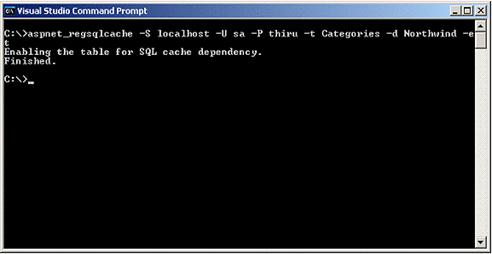
| It important to note that to run the aspnet_regsqlcache utility, open up the Visual Studio .NET command prompt and enter the command shown in the following screenshot. |
| |
 |
| |
| Database configuration involves two steps: |
| |
| 1. To allow the database for change notifications, which creates the change notification table and adds the required stored procedures: |
| |
aspnet_regsql.exe -S server -U user
-P password -d database -ed |
| |
server - Name of the Server
user - User ID to use to connect to the SQL Server
password - Password to use to connect to the SQL Server
database - Specifies the name of the database
ed - enables the database for SQL Server database triggered invalidation |
| |
| 2. To allow the table(s) containing the data you are using, which adds the necessary row to the change notification table and adds the required triggers to the source data table: |
| |
aspnet_regsql.exe -S server -U user
-P password -d database -t table âet |
| |
server - Name of the Server
user - User ID to use to connect to the SQL Server
password - Password to use to connect to the SQL Server
database - Specifies the name of the database
ed - enables the database for SQL Server database triggered invalidation
table - Table to configure
et - enables the tables for SQL Server database triggered invalidation |
| |
|
| |


