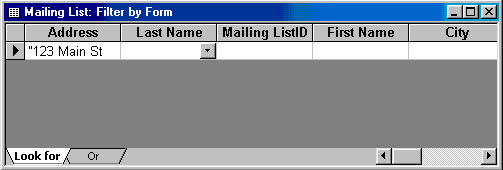
If the table is large, it may be difficult to
find the record that contains the value you would like to filter by so
using Filter by Form may be advantageous instead. This method creates
a blank version of the table with drop-down menus for each field that
each contain the values found in the records of that field. Under the
default Look for tab of the Filter by Form window, click in the field
to enter the filter criteria. To specify an alternate criteria if records
may contain one of two specified values, click the Or tab at the bottom
of the window and select another criteria from the drop-down menu. More
Or tabs will appear after one criteria is set to allow you to add more
alternate criteria for the filter. After you have selected all of the
criteria you want to filter, click the Apply Filter button  on the toolbar. on the toolbar. |