| Importing Exporting |
| |
| Importing |
| |
| Importing objects from another database
will create a complete copy of a table, query, or any other database
object that you select. Import a database object by following these steps: |
| |
| 1. Open the destination database. |
| |
| 2. Select File|Get External|Import from the menu bar. |
| |
| 3. Choose the database the object is located in a click the Import button. |
| |
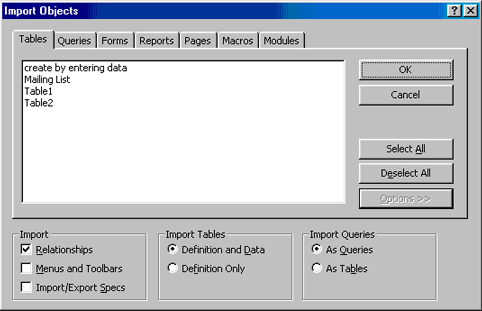
| 4. From the Import Objects window, click on the object
tabs to find the object you want to import into the database.
Click the Options >> button to view more options. Under Import
Tables, select "Definition and Data" if the entire table should
be copied or "Definition Only" if the table structure should be
copied but not the data. Under Import Queries, select "As Tables"
if the queries should appear as regular tables in the destination
database. Highlight the object name, and click OK. |
| |
|
| |
| 5. The new object will now appear with the existing objects in the database. |
| |
| |
|
| |
| |