| Introduction To Access |
| Â |
| Access |
| Â |
| Microsoft Access is a powerful program to
create and manage your databases. It has many built in features to
assist you in constructing and viewing your information. Access is
much more involved and is a more genuine database application than
other programs such as Microsoft Works. |
| Â |
| Microsoft Access can be used for personal information
management (PIM), in a small business to organize and manage all
data, or in an enterprise to communicate with server. |
| Â |
| Microsoft Access stores information in what is called a database.
For now it is good enough to know that your data is put into a database
and not worry about the details. We will be explaining databases
and other key Access elements in a later lesson. |
| Â |
| There are four major steps to using Microsoft Access: |
| 1. Database Creation: Create your Microsoft
Access database and specify what kind of data you will be storing. A retail
business might create a database to store all their sales information (i.e.
items sold, customer, employee, commission, etc) |
| Â |
| 2. Data Input: After your database is created the data
the store gathers every business day can be entered into the Access database. |
| Â |
| 3. Query: This is a fancy term to basically describe the
process of retrieving information from the database. |
| Â |
| Report (optional): Information from the database is organized
in a nice presentation that can be printed in an Access Report |
| Â |
|
| Â |
| Â |
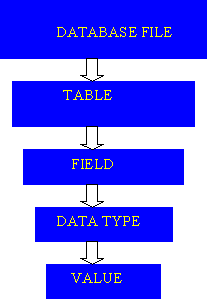
| Database File |
| This is your main file that encompasses the entire database and
that is saved to your hard-drive or floppy disk. |
| Â |
| Example) StudentDatabase.mdb |
| Â |
| Â |
| Table |
| A table is a collection of data about a specific topic.
There can be multiple tables in a database. |
| Â |
| Example #1) Students |
| Example #2) Teachers |
| Â |
| Â |
| Field |
| Fields are the different categories within a Table. Tables
usually contain multiple fields. |
| Â |
| Example #1) Student LastName |
| Example #2) Student FirstName |
| Â |
| Â |
| Datatypes |
| Datatypes are the properties of each field. A field only has 1 datatype. |
| Â |
| FieldName) Student LastName |
| Datatype) Text |
| Â |
| Â |
|
| Â |
| Â |