| Control Statement |
| |
| If...Else statement |
| |
| Types of If statement |
| If statement in Fortran is used for decesion making. Depending upon conditions we can use any of the following IF statements in our FORTRAN program : |
| |
| 1) Arithmetic IF statement |
| If in a program the condition is given as positive, negative or
zero, then the arithmetic IF statement is used to control the
statement. |
| The general form of arithmetic IF statement is: |
| IF ( CONDITION ) n1, n2, n3 |
| where: CONDITION is an arithmetic expression like integer, real,
or double precision expression and n1, n2 and n3 are three statement
numbers. If the arithmetic expression is negative, control is
transfer to statement n1, if it is zero then to n2 and if it is
positive then to the statement n3. |
| Example: |
| C PROGRAM
OF ARITHMETIC IF |
| C PROGRAM
FOR POSITIVE ZERO AND NEGATIVE |
| If
(b**2-4*a*c) 10,20,30 |
| 10 print*,
'Roots are complex' |
| Go
To 40 |
| 20 print
*, 'single real root' |
| 30 print
*, 'two real roots' |
| 40 continue |
| In this type of structure the program branches to statement label
10 if the arithmetic expression in parenthesis evaluates to less
than zero, or to 20 if it evaluates to be equal to zero or would
branch to 30 if it evaluates to greater than zero.
|
| |
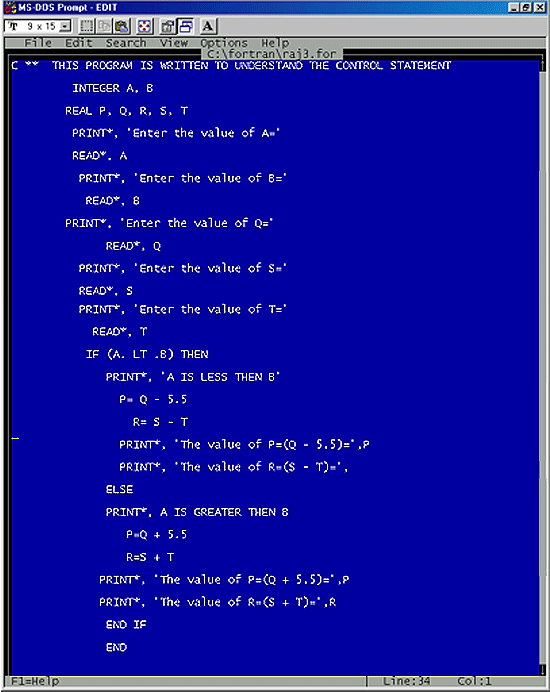
| 2) Logical IF statement |
| Logical IF Statement is used in a program when the condition is
given as true or false. It can be easily understood by this example:
If A is greater than B, is true then P=Q-5.5. Otherwise X=Y+5. |
| The general form of a logical IF statement is: |
| IF (CONDITION) THEN |
| Statment1 |
| Statment2 |
| ....................... |
| ....................... |
| ELSE |
| Statment3 |
| Statment4 |
| .................. |
| .................. |
| ENDIF |
| where CONDITION is a logical expression and Statment1,Statment2......,
and statment3, Statment4....are Fortran executable statements.
THEN must be in first line. |
| Note: ELSE and ENDIF are defined below: |
| Program: |
|
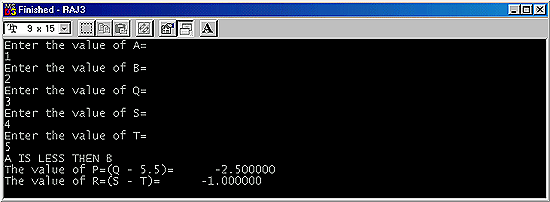
| From the above example readers can easily understand the use of
logical IF statements. Note: THEN must be in first line and ELSE
must have a separate line. |
| Output: |
|
| |
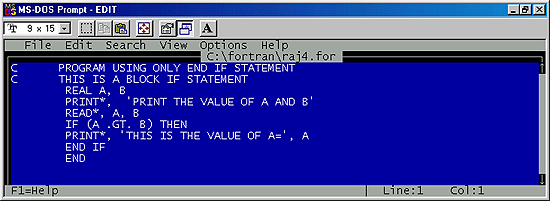
| 3) Block IF statement |
| The block IF statement is the statement which is used with the END IF statement or with the ELSE IF and ELSE statements to control the execution sequence. |
| The general form of a block IF statement is: |
| IF (CONDITION) THEN |
| where CONDITION is a logical expression. |
| Example: |
| IF(A .LT. B) THEN |
| P= Q-5.5 |
| END IF |
This example tells that if A is less than B then the value of P=Q+5.5.
THEN must be in first line. |
| Program: |
 |
| |
| Output: |
 |
| |
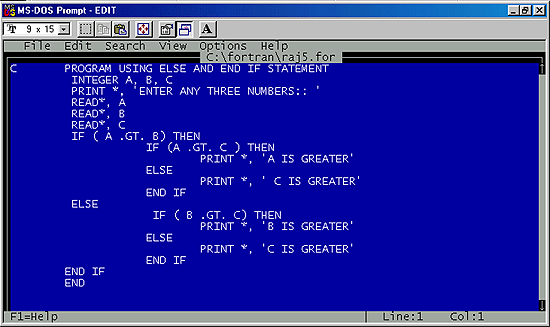
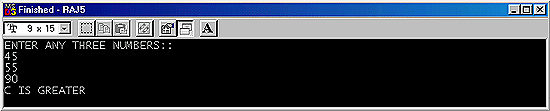
| Program: |
 |
| Output: |
 |
| |
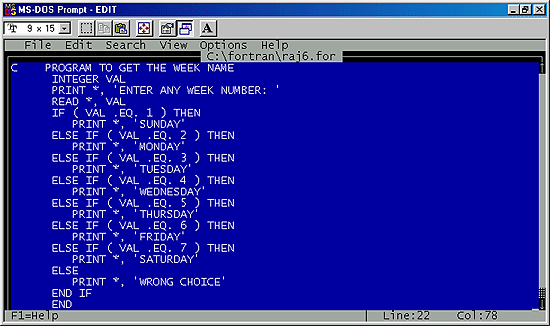
| 4) ELSE IF statement |
| If there are more than one alternative we can use ELSE IF statement with IF statement. ELSE IF statement is only used with If statement. It may be clear by the given example below the general form. |
| The general form of an ELSE IF statement is: |
| ELSE IF (CONDITION) THEN |
| where CONDITION is a logical expression. |
| Example: |
| IF( A .GT. B ) THEN |
| P= Q+2.5 |
| ELSE IF( B .GT. A )THEN |
| P=Q+2.5 |
| Program: |
 |
| |
| Output: |
 |
| |
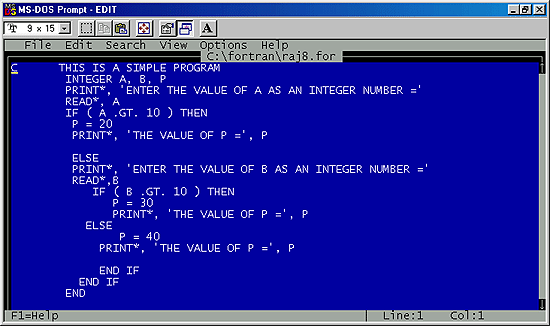
| 5) ELSE statement |
| It is Non-executable statement which provides only the information to the compiler for storage allocation. |
| The general form of an ELSE statement is: |
| ELSE |
| Example: |
| IF ( A .LT. B ) THEN |
| P= Q - 5.5 |
| R= S - T |
| ELSE |
| P=Q + 5.5 |
| R=S + T |
| END IF |
| END IF |
| Here first END IF is for first IF statement and second END IF is for second IF statement. |
| Program: |
 |
| |
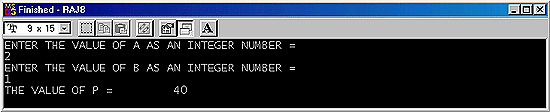
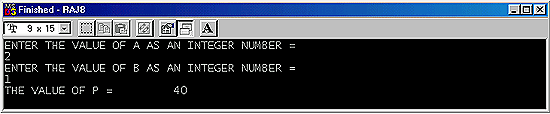
| Output: |
 |
| Output: |
 |
| |
| |
|
| |
| |