| Fortran Expression and I/O Statement |
| |
| How to write a simple program in Fortran |
| |
| As we know computer is a machine which have no mind. It does not
understand our language. Computer have own language which converts
our input data into its own language. For computer programming
in Fortran language each line of the program is written in coding
form which is known as Fortran coding form. |
| For writing a simple
Fortran Program follow the following steps: |
| 1) The first line starts with the letter C. This line is known
as comment line. Uses of this line gives help to the readers to
understand a program. A comment line does not affect the executable
program in any way and may be used to provide documentation. This
can be understand clearly as above discussed. It can be written
in 2nd, 3rd line also. |
| 2) After the comment line first Fortran statement is used which
is READ statement. The Fortran statement must be written between
columns 7 and 72. All embedded blanks statements are ignored in
a Fortran statement. It is written as READ*, input-list. |
| 3) Then other statements according to the program requirement. |
| 4) PRINT statement as PRINT*, output- list as above mentioned. |
| 5) STOP statement instruct the computer to terminate the execution
of the program. |
| 6) END statement is the last statement, It informs the compiler
to end or finish the program. |
| These are the steps to make a program in Fortran. |
| Example: |
 |
| |
| Here, |
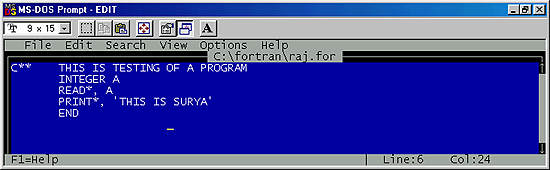
| C** THIS IS TESTING OF A PROGRAM |
| This is the first statement and is called comment statement. It
can be written any where in the program. It does not affect the
program. It depend upon you whether you want to write it or not. |
| INTEGER A |
| This is the second statement. Before giving any variable to the
computer it must be declared first. Here the A is declaration
of the integer variable. |
| Now the computer will easily understand the READ statement that
variable A is an integer data type. |
| READ*, A |
| Here the READ statement tells the computer to read or understand
the input list 'A' which is integer variable. |
| PRINT*, 'THIS IS SURYA' |
| The PRINT statement will print the value as an output which is
as THIS IS SURYA. That means whenever the value or any statement
is written in between a single cote, the exact value or the statement
displays on the output screen. |
| Note: When you run this program you must have to type an integer
value. |
| Example: |
| 2, 3,18161 etc. Lastly the program is ended with END statement. |
| Output of the above program is: |
22
THIS IS SURYA |
| Here the input is given as 22 an integer number and the output
comes as THIS IS SURYA |
| Output: |
 |
| Program: |
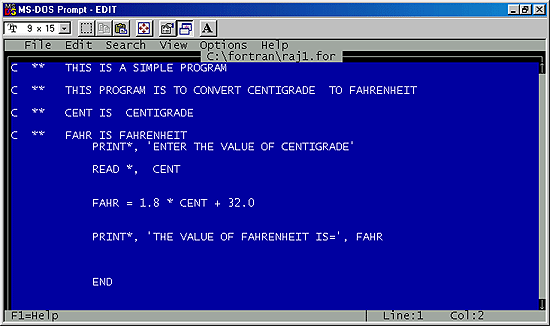 |
In the above program the first four lines are comment lines. The
first PRINT statement is used to display the exact line as given
in the print statement as: ENTER THE VALUE OF CENTIGRADE
READ statement is used as input statement. i.e. the compiler of
Fortran will read the given variable as: CENT, which is centigrade.
The next PRINT statement print the value of Fahrenheit and the
value on the screen displays as: THE VALUE OF FAHRENHEIT IS=
<value of variable FAHR>. |
| |
| Output: |
 |
| In the above program when you will run it, the first line tell
you to enter the value of centigrade. After being given the value
of centigrade the output will display as the value of Fahrenheit
as shown in the above output. |
| |
| |
|
| |
| |


